SFM Models: Complete Guide to Finding, Importing, Creating & Optimizing Models (2026)

You find the perfect model for your next animation, download it, and import it into Source Filmmaker. Instead of seeing your character, you’re met with missing textures, error models, or assets that don’t appear at all. A task that should take a few minutes quickly turns into hours of searching through forums and trying different fixes.

Most of these issues happen because creating and using SFM Models involves more than downloading files. Understanding model formats, folder structure, import steps, and optimization makes the entire process much smoother.

This guide walks you through every stage, from finding trusted models and importing them correctly to creating custom assets with Blender, optimizing performance, and fixing common errors. 

By the end, you’ll have a complete workflow that helps you build, manage, and use Source Filmmaker models with confidence.

What Are SFM Models?

what are sfm models

Source Filmmaker models are 3D assets used in Valve’s Source Filmmaker to create animations, posters, and cinematic scenes. These models include characters, weapons, props, vehicles, and environments that help bring a project to life.

A model is more than just a 3D object. It includes textures for appearance, materials for surface details, and a skeleton that allows it to move naturally during animation. All these elements work together to display the model correctly in Source Filmmaker.

You can use the built-in assets that come with SFM or import custom models from trusted community websites and the Steam Workshop. Understanding how these models work makes it easier to import, customize, and troubleshoot them while creating your projects.

Types of SFM Models

The most common types of SFM models include: 

  • SFM Character Models – Playable characters, NPCs, and custom avatars.
  • Prop Models – Everyday objects, furniture, tools, and decorative items.
  • Weapon Models – Guns, swords, explosives, and other equipment.
  • Vehicle Models – Cars, trucks, aircraft, boats, and other vehicles.
  • Environment and Map Models – Buildings, terrain, rooms, and complete scene layouts.

Where to Download SFM Models Safely

Here are some of the most popular websites for downloading SFM models safely: 

Steam Workshop

If you’re looking for SFM workshop models, Steam Workshop is one of the safest and easiest places to start. It is integrated with Steam, so you can browse thousands of community-created characters, props, maps, and other assets in one place.

To download a model, open the Source Filmmaker Workshop page, choose the asset you want, and click Subscribe. Steam automatically downloads the files and adds them to your Source Filmmaker library, so you don’t have to move files manually. 

Each workshop page also includes screenshots, user ratings, and creator information, helping you choose reliable models with confidence.

SFMLab

SFMLab is a popular community platform for downloading custom SFM models that aren’t available on Steam Workshop. It hosts characters, props, environments, textures, and other assets shared by artists for machinima and 3D animation projects.

Most downloads are available as ZIP or 7Z files. You’ll need to extract the files and install them manually in Source Filmmaker. Many creators also include helpful setup guides with their uploads.

GameBanana

GameBanana is a trusted community website where you can download mods and SFM props for Source Filmmaker. You’ll also find character models, maps, textures, and other community-created assets.

Each download page includes user ratings, screenshots, and community feedback. These details make it easier to find high-quality assets before downloading them.

Open3DLab

Open3DLab is a community platform that offers SFM maps, characters, props, and other assets for Source Filmmaker projects. It is a useful option when you need content that isn’t available on Steam Workshop.

Many uploads include additional resources such as textures, animations, or model variations. Make sure you download all the required files so the asset works correctly in your project.

DeviantArt

DeviantArt is home to many artists who share SFM characters and other custom assets for free. You’ll also find character ports, outfits, accessories, and model packs created by experienced members of the SFM community.

Download models from trusted creators with a good reputation. Use the links provided by the artist and avoid files from unknown or unverified sources. This helps you download authentic assets and reduces the risk of unsafe files.

Sketchfab (Compatible Assets)

Sketchfab offers a large collection of free and paid 3D models created by artists from around the world. Many of these models can be downloaded in formats like FBX or OBJ, making them useful for a blender to SFM workflow.

These models are not ready to use in Source Filmmaker. You’ll need to import them into Blender first, prepare the model, and then convert it before using it in your SFM project.

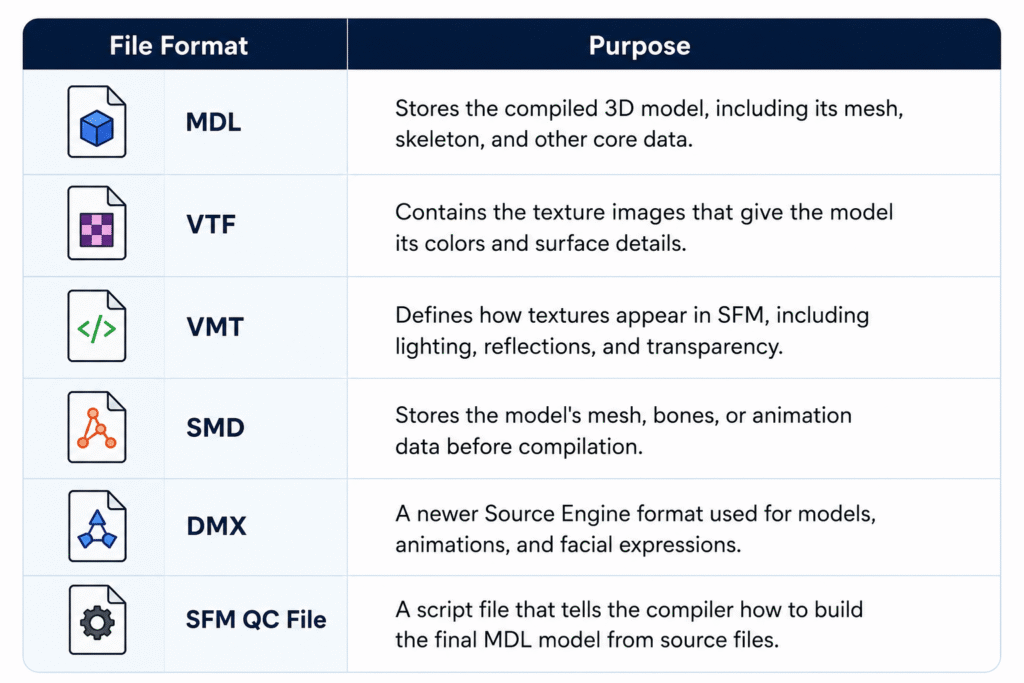
Essential File Formats Used in SFM Models

Every SFM model relies on different file formats, and each one has a specific job in displaying, compiling, and animating the model correctly.


file formats used in sfm models

How to Import SFM Models

import sfm models


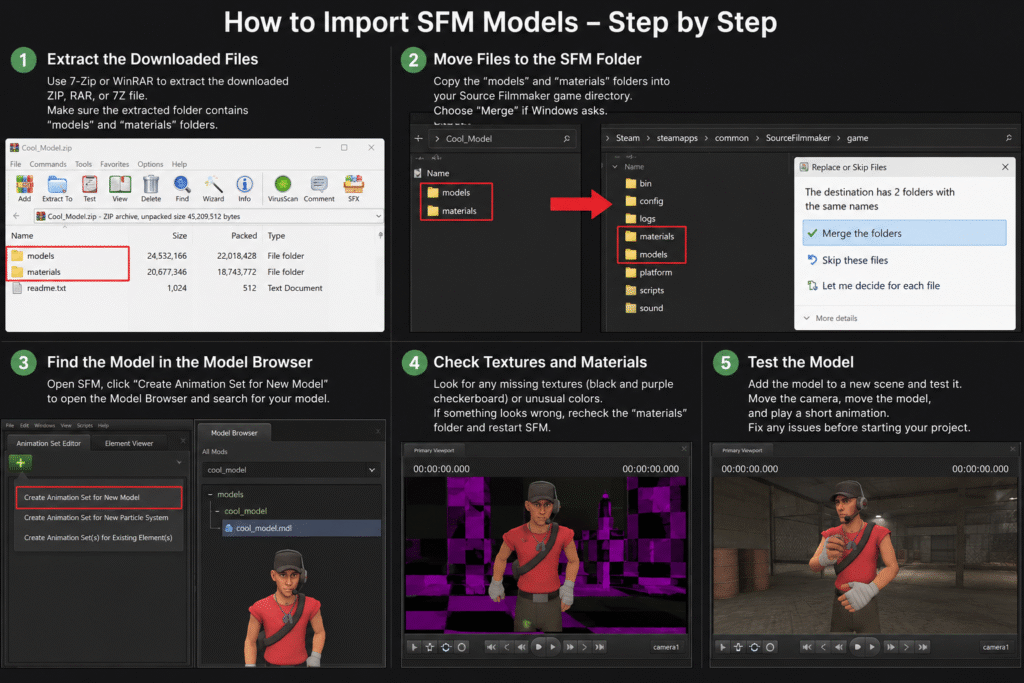
To import models into SFM, follow these steps in the correct order to ensure the model loads properly and works as expected: 

Extract the Downloaded Files

Most SFM models are downloaded as ZIP, RAR, or 7Z files to keep all the required files together. Before you can use the model, extract the archive with a tool like 7-Zip or WinRAR.

After extracting, open the new folder and make sure it contains folders such as models and materials. These folders include the files needed to install and display the model correctly in Source Filmmaker.

Move Files to the SFM Folder

Open the extracted folder and locate folders such as models and materials. Copy these folders into your Source Filmmaker game folder so the software can find the new assets.

If Windows asks to merge folders, choose Merge instead of replacing existing files. This keeps your current SFM files intact while adding the new model to your library.

Find the Model in the Model Browser

Open Source Filmmaker and create or open a session. Select Create Animation Set for New Model to open the Model Browser, then browse or search for the model you just installed.

If you can’t find the model, check that the files were copied to the correct folders and restart Source Filmmaker if needed. Some Workshop models may also appear under the Workshop filter in the Model Browser.

Check Textures and Materials

After importing the model, check that all textures and materials load correctly. If you see black and purple checkerboard patterns, missing textures, or unusual colors, some required VTF or VMT files may be missing or placed in the wrong folder.

If you notice any issues, verify that the materials folder was copied correctly and restart Source Filmmaker after making changes. This allows SFM to reload the updated files and display the model properly.

Test the Model

Add the model to a new scene and check that it loads correctly. Rotate the camera, move the model, and play a short animation to confirm that the textures, materials, and skeleton are working as expected.

If you notice SFM errors, such as missing parts, invisible models, or broken textures, review the previous installation steps before continuing with your project. Testing the model early helps you identify and fix problems before you start animating.

How to Create Custom SFM Models

Creating a custom model involves designing, SFM model compilation, and importing it into Source Filmmaker. Follow these steps in the correct order: 

Create the Model in Blender

Start by creating your 3D model in Blender using basic shapes or by editing an existing model. Keep the design clean and avoid adding unnecessary details, as simpler models are easier to edit and optimize.

Before moving to the next step, check that the model has the correct shape, scale, and proportions. Fixing these details early saves time and reduces the need for changes later.

Create UV Maps

UV mapping tells Blender how a 2D texture should wrap around a 3D model. Create a UV map before adding textures so the colors and details appear in the correct places.

After unwrapping the model, check the UV layout for overlapping or stretched areas. A clean UV map helps textures appear sharp and prevents visual distortions on the model.

Rig the Model

Rigging is the process of adding a skeleton, also called an armature, to your 3D model. This allows the model to move naturally when you create animations in Source Filmmaker. 

After adding the bones, test a few simple movements to make sure the mesh deforms correctly. Fix any parts that bend or stretch incorrectly before moving to the export step.

Export the Model Using Blender Source Tools

After the model is ready, use Blender Source Tools to export it in a Source Engine format such as SMD or DMX. These formats are supported by Crowbar and are used to prepare the model for Source Filmmaker.

Before exporting, check that the correct model and armature are selected. Save the exported files in an easy-to-find folder so you can use them during the compilation step.

Compile the Model with Crowbar

Open Crowbar and load your QC file. During SFM Compile, Crowbar uses the QC file along with the exported model files to create the final MDL file that Source Filmmaker can read.

When the compilation is complete, check the results for any errors or warnings. If the process finishes successfully, your compiled model is ready for the final import step.

Import the Model into Source Filmmaker

After SFM Compilation is complete, copy the compiled model files to the correct Source Filmmaker folders if they are not already there. Then open Source Filmmaker and use the Model Browser to locate and load your new model.

Once the model appears in your scene, check that the textures, materials, and animations work correctly. If everything loads without errors, your custom model is ready to use in your animation project.

Need Help with SEO?

Our team helps brands improve rankings through high-quality backlinks, content marketing, and proven SEO strategies. Let's discuss your goals and create a customized plan to grow your organic traffic.

Best Tools for Creating SFM Models

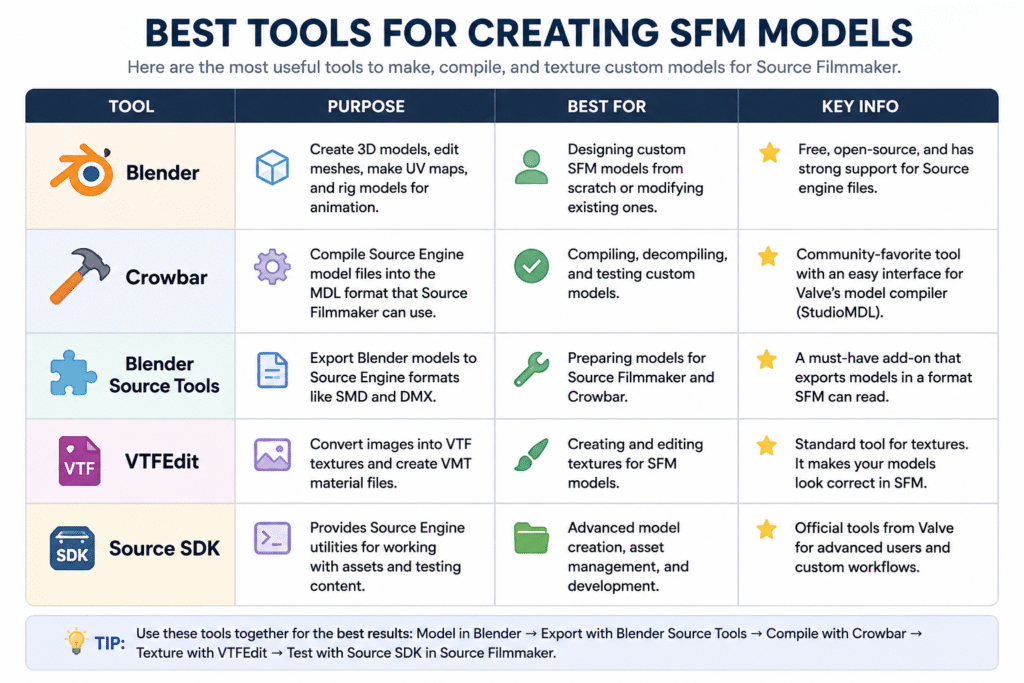
The table below highlights the most commonly used SFM tools, along with their purpose, best use case, and key features.  


tools for sfm models

How to Optimize SFM Models

Use below SFM optimization tips to improve performance and reduce lag. 

Reduce Polygon Count

Models with a high polygon count require more processing power and can slow down your scene. Use simpler models whenever possible, especially for background objects that don’t need a lot of detail.

If you’re creating your own model, remove unnecessary geometry without changing its overall shape. This helps improve viewport performance and reduces rendering time, especially in larger scenes.

Optimize Textures

Large texture files use more memory and can affect performance. Choose a texture resolution that matches the model instead of using high-resolution images for every asset. 

Remove textures that are no longer needed and compress image files when possible. This reduces memory usage and helps Source Filmmaker load scenes more efficiently.

Optimize Materials

Use only the material settings your model needs. Effects like reflections, transparency, and complex shaders can increase rendering time and reduce performance. 

Keep material files simple and remove settings that aren’t being used. Well-optimized materials help models render more efficiently while maintaining a consistent appearance.

Use Level of Detail (LOD) Models

Level of Detail (LOD) models use different versions of the same model with varying amounts of detail. Source Filmmaker can display a simpler version when the model is farther from the camera, helping improve performance.

Use high-detail models for close-up shots and lower-detail versions for background scenes. This reduces the workload on your system without noticeably affecting the final animation.

Optimize Bones and Rigging

Use only the bones your model needs for animation. Extra or unused bones can make the rig more complex and increase the amount of processing required.

Check that each bone is linked correctly and moves the right part of the model. A clean rig makes animations smoother and helps prevent unexpected movement during posing or animation.

Optimize Lighting and Effects

Use only the lights and visual effects needed for your scene. Too many lights, shadows, or particle effects can slow down viewport performance and increase rendering time.

Start with a few lights and add more only when necessary. This keeps your scene easier to manage while maintaining clear and consistent lighting.

Improve Scene Performance 

Keep only the models, lights, and effects needed for your scene. Fewer objects make SFM rendering smoother and reduce the time it takes to preview or render your animation.

Close unused animation sessions and remove assets you no longer need. A clean scene is easier to work with and helps maintain consistent performance as your project grows.

Common SFM Model Problems and Fixes

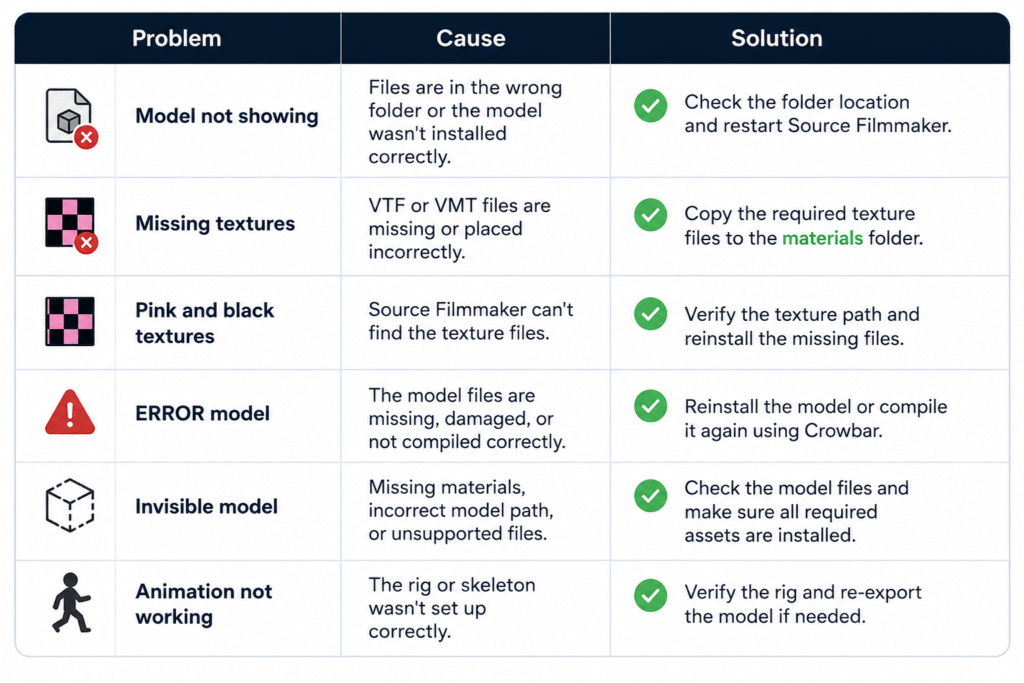
This SFM tutorial covers common model issues and their solutions. Use the table below for quick fixes. 

common problem

Best Practices for Managing SFM Models

Use these best practices from this Source Filmmaker guide to keep your models organized and avoid common issues over time.

  • Organize Your Model Library: Store characters, props, maps, and other assets in separate folders for easier access.
  • Use Clear File Names: Use simple, descriptive names to identify files quickly.
  • Keep Backup Copies: Back up custom models before editing or replacing files.
  • Remove Duplicate Assets: Delete duplicate or unused models to save storage space.
  • Store Related Files Together: Keep model files, textures, and materials in their correct folders to avoid missing file issues.
  • Download Models from Trusted Sources: Download models from reliable websites to ensure they are complete and compatible

Wrap Up

Building a smooth workflow starts with understanding how models are downloaded, imported, created, and managed. Following the right steps helps you avoid common issues like missing textures, loading errors, and compatibility problems before they affect your project.

With the right approach, SFM Models become much easier to work with. Use trusted resources, keep your files organized, and optimize your assets regularly to create cleaner scenes and a more efficient animation workflow.

FAQs

How to import models into SFM from Workshop?

Open the model’s Workshop page and click Subscribe. Steam will download the files automatically. Restart Source Filmmaker if needed, then open the Model Browser to find and use the model.

How to convert Blender models to SFM?

Create or edit your model in Blender, export it using Blender Source Tools, compile it with Crowbar, and then import the compiled files into Source Filmmaker.

Can I use models from other Source Engine games in SFM?

Yes. Many models from games like Team Fortress 2, Half-Life 2, and Left 4 Dead can be used in Source Filmmaker after they are extracted and placed in the correct folders.

Are SFM models free to use?

Many SFM models are free to download from community websites. However, always check the creator’s license before using a model in public or commercial projects.

Do all SFM models work with every version of Source Filmmaker?

No. Some models may require additional files, specific Source Engine assets, or manual setup. Always check the model’s requirements before downloading

Search Engine Basics in 2026: Everything Has Changed with AI Search

Most people are convinced they understand the concept of how search engines work. You enter the search query, and you get search results. But in 2026, what is behind the pages you see looks really different from what it did a few years ago.

It’s being driven by artificial intelligence.

The results page you see today is not just a list of links. There are AI-generated summaries, direct answers, and cited sources coming over everything else. 

But still, the businesses winning in search right now, and in the past, have not let go of their foundational search engine basics. Despite everything AI does, the underlying structure and methodology for how a search engine discovers and evaluates your content remains exactly the same.

This guide walks you through the internet search engine basics from scratch, what has changed actually now in 2026, and what impact it will have on your website.

What Are Search Engine Basics?

how search engine works

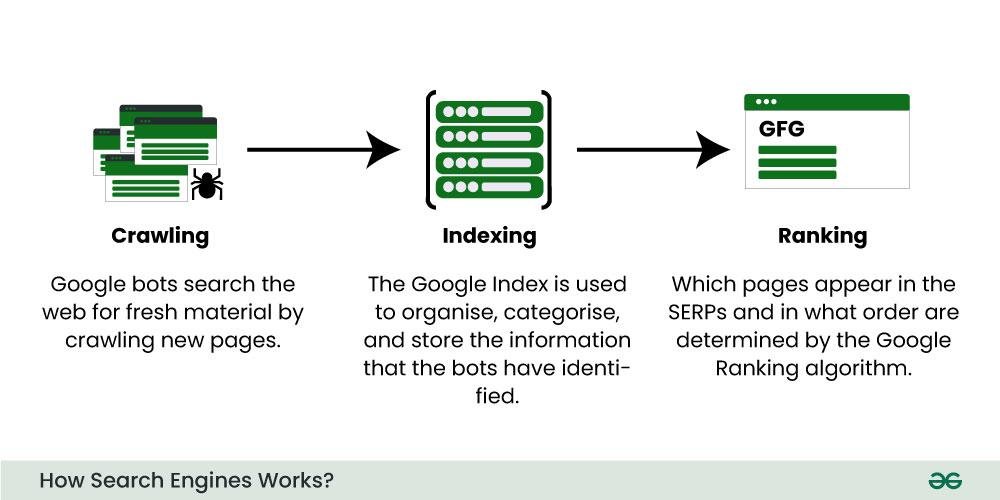
Source:– geeksforgeeks

Simply put, the function of a search engine is to enable people to discover information on the internet. You enter a query, and the search engine scans through trillions of websites to deliver the most appropriate results. 

These three things are the basic functions of a search engine: crawl, index, and rank, and have been since time immemorial, including the AI-powered ones. 

Crawling: This process begins when search engines discover any new content. Crawlers, also known as bots or spiders, are automatic pieces of software that travel around the internet by accessing link after link from one site to another. 

Indexing: In this next phase, any content which is discovered while crawling will be compiled and stored in a huge database which can be rapidly searched and recalled.

Ranking: It’s the last step. The user types the query, the search engine retrieves relevant pages from its index, and orders them according to hundreds of signals – relevance, authority, page quality, and more. 

The search engine basics should not be missed because, without them, any SEO effort that you undertake does not build upon solid grounds. You cannot optimise what you do not know.

Types of Search Engines in 2026

Not all search engines work the same way or serve the same purpose. In 2026, there are three main categories worth knowing.

Traditional Search Engines

These are probably the first search engines people think about. Even now, Google, Bing and Yahoo still process most of the search requests happening across the world. All three of these search engines thoroughly scan the web, compile very large indexes, and deliver ordered sets of results. Google still dominates, though Bing has started catching up due to its tight integration with various Microsoft AI-based software tools.

Classic search engine examples here include Google, Bing, Yahoo, Baidu, and DuckDuckGo.

Vertical or Niche-Specific Search Engines

These index content within a category, such as YouTube for videos, Amazon for products, LinkedIn for professional information, or Zillow for property listings. Each of these could be considered a search engine in its own. 

Quite a lot of those belong to niche search engines. Here are 10 examples of search engine types to give you some perspective: YouTube, Amazon, Pinterest, Booking.com, LinkedIn, Etsy, Indeed, Yelp, Houzz, and Zillow. Working these requires a different set of SEO skills entirely.

AI-Powered Search Engines

Perplexity, Google AI Overviews, ChatGPT Search and Microsoft Copilot bring several pages together, stitch together the content and respond to your query right on the Search Engine Results Page (SERP).

The person doesn’t even have to navigate to your webpage, and you have answered the question in a “zero-click” scenario, as SEO professionals have named it. Your page can have great organic rankings, but since the answer was shown above the fold of your page, the user never visits the site to navigate your content.

How Do Search Engines Work 

Here’s how search engines work in a step-by-step process for the clear sake of knowing what happens when someone types in a query. 

Discovery: A crawler lands on a different URL because of a submission via a sitemap, or they clicked a link to another page. This is why sitemaps and internal linking matter.

Crawling: The bot crawls the page’s content, code, and links. It verifies the headings, text, imagery, and speed of the page. The basics of how search engines actually crawl your site are essential here; failing this initial phase with robots.txt blocking your site or internal dead links is what most people struggle with first.

Indexing: Provided the content is crawlable and adheres to quality criteria, the search engine will add it to its index. Some thin-content pages or pages with no defined subject, or duplicate textual content on some pages may never be indexed or given a poor rank.

Ranking: When someone searches, the engine compares your query against its index of the web and passes it through its algorithm to determine the result. What comes out is an ordered list or, with modern AI search engines, a compiled answer from numerous indexed pages.

Display: The results show up on the page. Usually, in traditional search, this is a ranked list. For AI search, it’s going to be a paragraph, and there are citations underneath it.

The next step depends on the previous one. If your site is not crawlable, then your site is not indexable. If your site is not indexable, then your site is not rankable. The degree of understanding search engine basics will show you what you should be looking at when things start going wrong.

Key Search Engine Ranking Factors in 2026

Although the same ranking factors were important five years ago and still are important today, there are some factors that have been introduced since 2026.

Content quality and depth are the leading contributors. This is because search engines have a preference for the page which properly answers your queries, rather than those full of keywords.

E-E-A-T (Experience, Expertise, Authoritativeness, Trustworthiness) is now at the core of how Google judges content. It counts regardless of the subject matter. 

Backlinks remain incredibly powerful. Search engines perceive an authoritative link that is related to your content as evidence that you’ve produced content worth referring to. Getting a significant number of backlinks needs a strong backlink-building methodology.

Page experience metrics like site speed, mobile use, and the Core Web Vitals impact ranking. If your site is slow to load, it cannot compete.

Structured data is becoming increasingly prevalent because of the boom in AI search. If your content is properly structured, there will be a higher chance that the AI search engines can understand and reference your work in AI-driven responses.

Topic authority is a new and more essential concept. Websites that produce in-depth content are valued over those that publish single articles on obscure topics.

That’s when the Search engine basics come into play. These factors – content, authority, technical health and links – are far from trends. They are the non-negotiables.

Why AI-Built Websites Lack SEO Basics

Many businesses are relying heavily on AI in 2026 to create websites and push content quickly. But speed is not the same as structure.

Often, what AI tools leave behind is all the technical groundwork required by search engines. Pages go live without headings arranged hierarchically, missing or random internal links, non-specific meta-descriptions, and incomplete crawl paths. 

This content could be perfectly readable for a human, but for the search engine bot, on the other hand, this page looks like a mess with zero signals of the core subject of the site, no proper structure and no sign of high authority on the page.

This is precisely the reason why learning search engine basics has become the absolute most crucial requirement in 2026. Even though AI can churn out all your website content much faster, it cannot substitute for clever and effective strategies necessary for developing a website that search engines will actually use to index and list your site above other search results.

SEO Challenges in 2026

This move towards AI-driven search also comes with challenges and issues that didn’t exist before. 

The number one challenge is zero-click results. Google’s AI Overviews now provide answers to many searches even before a user ever scrolls to organic results. Many websites that depend on top-of-the-funnel traffic see a lot of their traffic decline.

Personalised results may make it hard to know where you truly stand. When two people do the exact search from two unique locations, and with varied search histories, it can result in different result pages.

Search is evolving with conversational queries. People no longer type simple keywords but fully formed questions when they search. You need to structure your content in this way, too, instead of merely targeting keywords.

Content saturation is real. With the ability for AI to publish at nearly zero cost and zero time, websites are clogged with so much content. To even stand out, one needs to have real value, a unique perspective, & well built off-page SEO signals.

The Future of Search Engines

There’s one clear direction for Search: the engine does more of the work, and the user does less. You don’t have to type in a well-formed search query and scroll through links; you ask, and the Search engine does the rest.

A big part of this transition is multimodal search. It means people search using an image, a video or a voice input rather than using only text. If you optimise content only for typed queries, you are missing a growing portion of how people search. 

AI agents are going even further. AI tools crawl websites, bring information together from different sources and give you an answer at the end. You don’t have to click or go to any pages; you get one single output.

For website owners, it’s a whole different game in what a successful presence on a search engine actually is. It’s no longer about appearing on page one; it’s now about becoming a source that AI engines know they want to reference when generating their answer.

It takes four things to get there: in-depth, accurate content on a subject; excellent technical foundations so search engines can crawl a page easily; proper schema that helps AI tools read and comprehend your content; and a backlink profile that signals authority.

All businesses willing to invest in guest post services and build out their off-page authority will be set up for a bright future.

FAQs

What are search engine basics?

The basics of a search engine (and SEO fundamentals) can be defined as a sequence of procedures to search for information, collect, analyse, and show the relevant material. Search engines comprise of 3 primary steps: Crawling, Indexing and Ranking

Why are search engine basics important for SEO?

If you do not know the basics of how search engines work, you may be prone to certain technical SEO mistakes which cause your content to disappear from the search index totally.

Is SEO replaced by AI?

No. Although search results have changed through AI, the underlying work of crawling, indexing, and ranking is all still there. In a way, SEO is transforming rather than disappearing. 

What is a search engine and its types?

Search engine: it is a software that retrieves information from the web based on a query a user has typed in the search bar. Generally, there are three categories of search engines: the ‘basic’ or’ general’ ones like Google or Bing, the’ vertical’ or’ special’ ones like Amazon and then the ‘AI’ ones like Perplexity or ChatGPT Search.

Final Word

The way people search has changed significantly. AI is now part of every major search engine, and the results page looks nothing like it did a few years ago. But the search engine basics, crawl, index, and rank, are still running underneath. 

The current top-performing sites in search create thorough, in-depth content on topics, receive good links from credible resources and have the proper technical structure. That’s what had been working all of prior to AI search. 

If ranking in 2026 is a priority for you, stick to the fundamentals. Make sure your site can be crawled. Write content that people and search engines both find useful. Build links that carry real weight.

SFM Compile: Complete Guide to Workflow, Process, QC Files & Common Errors (2026)

You spend hours creating a 3D model. The textures look perfect. The animations are ready. Then you import it into Source Filmmaker, and instead of your character, you see a purple-and-black checkerboard or nothing at all. It is a frustrating moment that almost every beginner experiences.

SFM Compile solves that problem. It converts 3D models from formats like FBX or OBJ into files that the Source Engine can read. It also packages textures, animations, physics data, and other assets using a QC file, so your model loads correctly in Source Filmmaker.

By the end of this guide, you’ll know how to compile models correctly, understand the files created during compilation, avoid common mistakes, and follow a workflow that saves time. 

Software You’ll Need for SFM Compile

SFM Compile

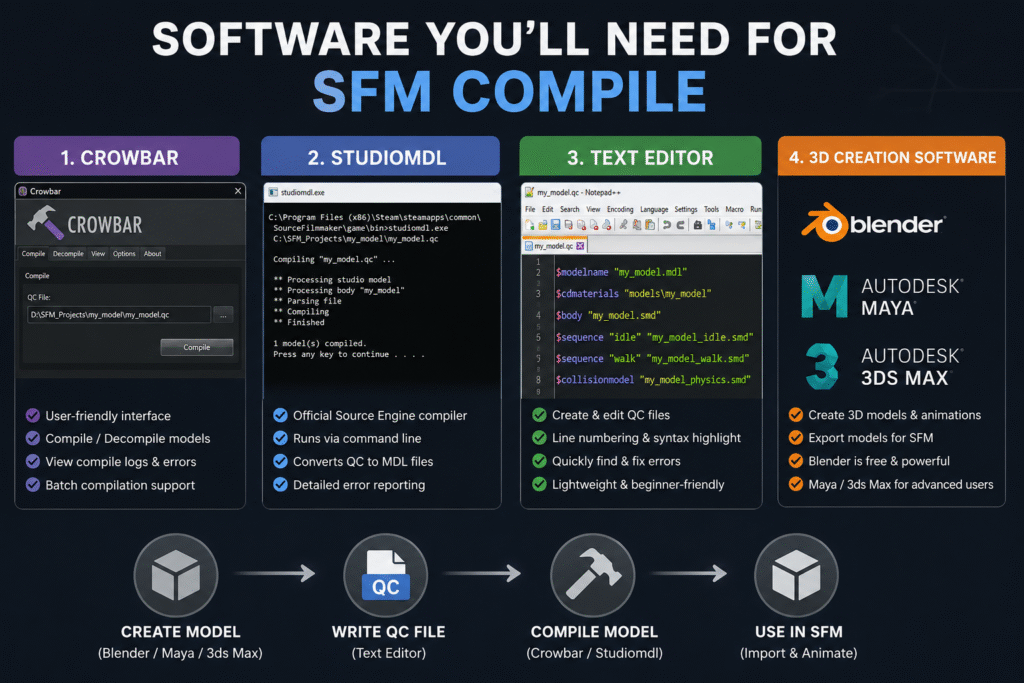
Before you compile a model, you need a few essential tools. Each piece of SFM compile software has a specific job in the workflow. 

Crowbar Compilation Tools

Crowbar is one of the most popular tools for compiling Source Filmmaker models. Instead of typing long command-line instructions, you can compile models through a simple interface. This makes the process much easier, especially if you’re new to SFM.

You can use Crowbar to compile or decompile models, check compile logs, and quickly spot errors if something goes wrong. It also supports batch compilation, so you can process multiple models without repeating the same steps for each one.

Studiomdl Command Line Utility

Studiomdl is Valve’s official model compiler for the Source Engine. It is included with the Source Filmmaker installation and is usually located in the bin folder. The tool reads your QC file and converts your model into the MDL files that Source Filmmaker can load.

Unlike Crowbar, Studiomdl runs through the command line, so you need to enter compile commands manually. It gives you more control over the compilation process. It also shows detailed error messages that help you find and fix problems. 

Text Editor Needs

You’ll also need a text editor to create and edit QC files. Notepad++ is a popular choice because it is lightweight, easy to use, and works well with plain text files.

Features like line numbering and syntax highlighting make QC scripts easier to read. If the compiler reports an error, you can quickly find the correct line and fix the problem without searching through the entire file.

3D Creation Software

Every SFM project starts with a 3D modeling program. Blender is the most popular choice because it’s free, powerful, and supports plugins that simplify exporting models for Source Filmmaker.

Professional artists may also use Autodesk Maya or 3ds Max to create custom models and animations. These are paid tools with advanced features, but for most beginners and hobbyists, Blender provides everything needed to build and prepare models for compilation.

SFM Compile: A Step-by-Step Guide

The SFM compile process follows a series of simple steps. Completing each one in the right order helps your model compile correctly and reduces errors. 

Set Up Your Model Assets 

Organize your model, textures, materials, and QC file into the correct folders before compiling. A clean folder structure helps the compiler locate every file and prevents path-related errors.

Keep your model optimized and use Source Engine bone naming conventions. Export the main model and collision mesh as separate SMD files. Also, verify that all VMT and VTF material files are in the correct location. Missing material files or incorrect paths usually cause the purple-and-black checkerboard texture in Source Filmmaker.

Before compiling, check that every file name and path matches the entries in your QC file. This simple step can prevent many common compile errors.

Write a Valid QC File 

An SFM QC file tells the compiler how to build your model. It defines where your model files are stored, where to save the compiled output, which materials to use, and which animations or physics data to include. 

QC Directive Purpose
$modelname Sets the name and output location of the compiled model.
$body Specifies the main SMD model file to compile.
$cdmaterials Points to the folder containing your material (VMT) files.
$sequence Adds animation sequences to the compiled model.
$collisionmodel Defines the collision mesh used for physics interactions.

Before compiling, review every file name and folder path in the QC file. A single typo or missing file reference can prevent the model from compiling successfully.

Run the SFM Compiler

Once your model assets and QC file are ready, it’s time to run the SFM compiler. If you’re using Crowbar, open the Compile tab, select your QC file, and click Compile. Crowbar displays the compile log in a readable format, making it easier to spot missing files or incorrect paths.

If you’re using studiomdl.exe, open the command line, navigate to the bin folder in your Source Filmmaker installation, and run the compiler using your QC file as the input. After the process finishes, review the compile log for warnings or errors before importing the model into Source Filmmaker.

Perform Final Model Testing

Open Source Filmmaker and load your compiled model into a new scene. Check that the model appears correctly, the textures load properly, and the animations play without errors. Move the model’s joints to confirm the bones are working as expected.

If you notice missing textures, distorted meshes, or physics problems, review the compile log first. The log often identifies the QC directive or file that caused the issue, making it much faster to find and fix the problem before compiling again.

Need Help with SEO?

Our team helps brands improve rankings through high-quality backlinks, content marketing, and proven SEO strategies. Let's discuss your goals and create a customized plan to grow your organic traffic.

Understanding SFM Compile Output Files

Every successful compilation generates several output files. Each file has a specific role, and if one is missing, your model may not load or function correctly.

File Purpose
.MDL The main model file that Source Filmmaker loads.
.VVD Stores vertex data used to render the model correctly.
.DX90.VTX Contains optimized mesh data for DirectX 9 rendering.
.SW.VTX Stores mesh data for software rendering compatibility.
.PHY Holds collision and physics information if the model uses physics.
.ANI  Stores animation data for some compiled models.

If any required output file is missing or corrupted, Source Filmmaker may fail to load the model or display it correctly.

Common SFM Compile Errors and Their Solutions

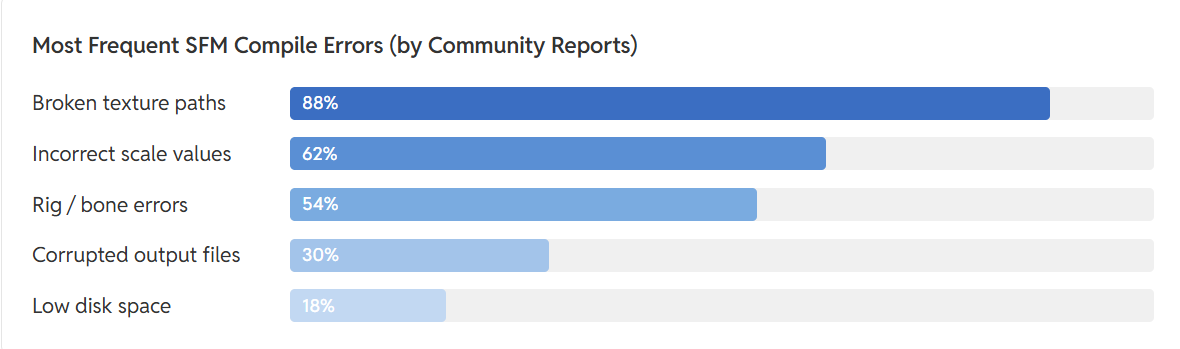
sfm compile errors

                                                      Source: FOSS post

Most common SFM compile errors are caused by missing files, incorrect QC settings, or invalid file paths. The compile log usually identifies the file or QC directive responsible.

Error Cause How to Fix It
Purple-and-black checkerboard textures Missing or incorrect VMT/VTF files, or an invalid $cdmaterials path Verify the material files exist and update the $cdmaterials path in the QC file.
Model is invisible or the wrong size Incorrect export scale or unit settings Re-export the model using the correct scale and apply transforms before exporting.
Bones don’t move correctly Missing or incorrectly named bones, or rigging errors Check the skeleton hierarchy and use Source Engine bone naming conventions.
Model fails to compile Missing SMD files, incorrect file paths, or QC syntax errors Review the compile log and fix the reported file path or QC directive.
Source Filmmaker crashes when loading the model Corrupted compile output or unsupported model data Recompile the model after fixing errors and replace any damaged output files.

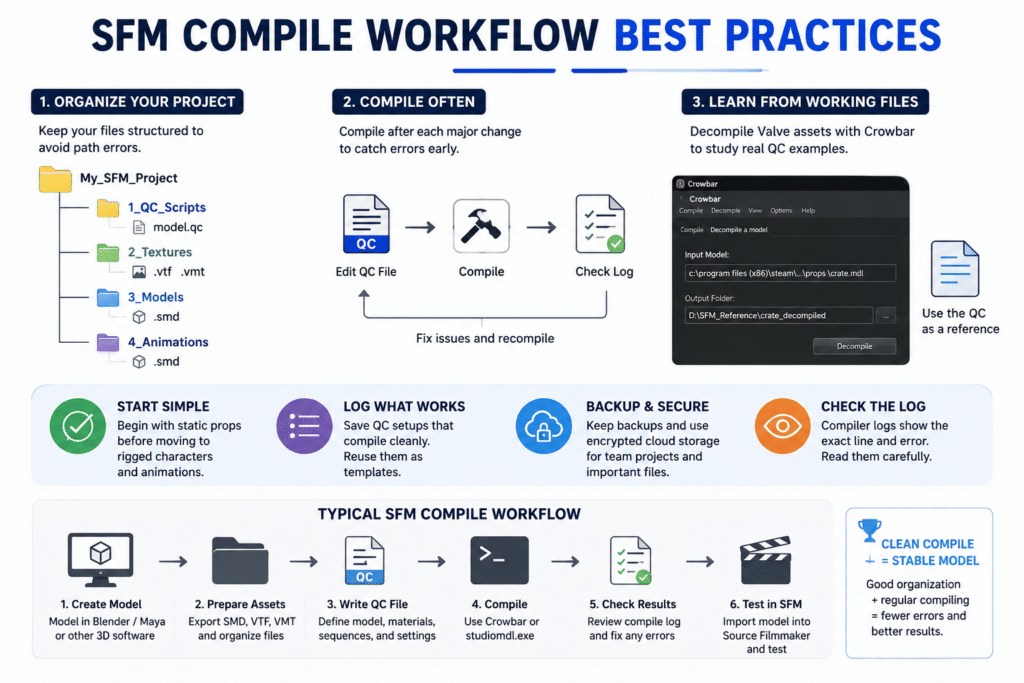
SFM Compile Workflow Best Practices

SFM Compile Workflow

Following a few SFM compile best practices can help you avoid repeated errors and make your workflow easier to manage.

  • Organize your project into separate folders for models, textures, materials, and QC files. This keeps file paths consistent and reduces compile errors.
  • Save a copy of every QC file that compiles successfully. You can reuse it as a template for future projects.
  • Start with simple static models before compiling animated characters or complex rigs.
  • Compile after every major change instead of making multiple edits at once. This makes it easier to identify what caused an error.
  • Decompile Valve’s default models with Crowbar to study working QC files and folder structures.
  • Keep backup copies of your project files. If you’re working with a team, use secure cloud storage with version history to avoid losing changes.

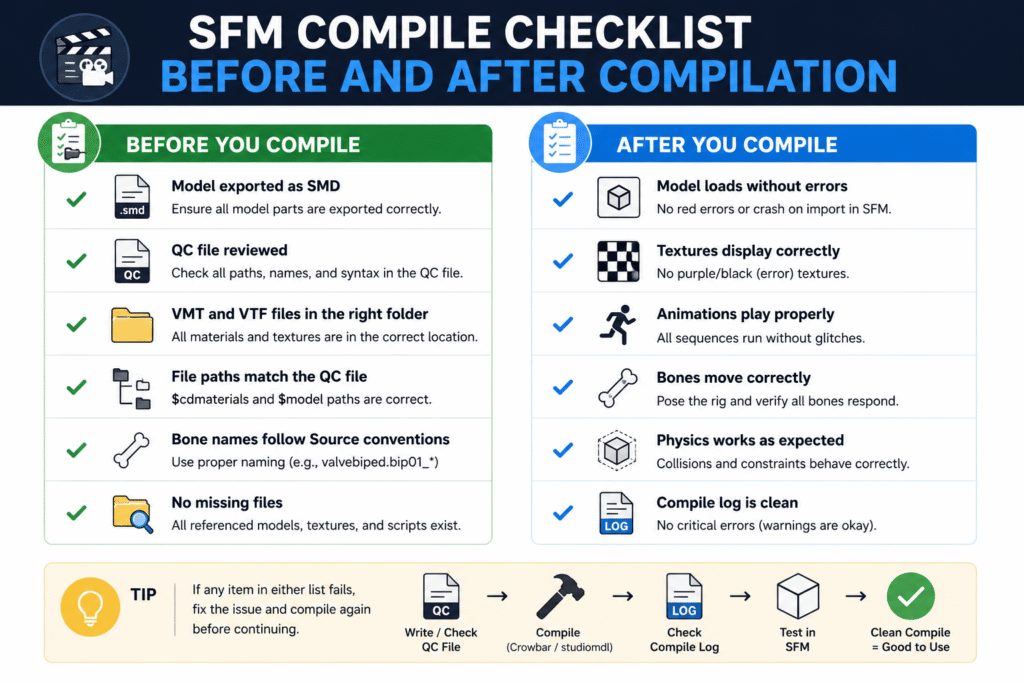
SFM Compile Checklist Before and After Compilation

SFM Compile checklist

A quick checklist helps you catch small mistakes before they become compile errors. Review these points before compiling and after importing your model into Source Filmmaker.

Beginner’s Guide to SFM Compile

SFM compile for beginners becomes much easier when you learn one step at a time. Start with simple models, understand the basics, and build confidence before working on complex projects. 

Start with a Simple Low-Polygon Model

Start with a simple static prop instead of a fully rigged character. A low-polygon model with a single texture is easier to compile and helps you learn the workflow without dealing with bones, animations, or complex physics.

Once the model compiles successfully, test it in Source Filmmaker to confirm it loads correctly. After that, you can move on to animated models and more advanced projects.

Install and Set Up Your SFM Tools 

Install Crowbar, studiomdl.exe, and a text editor like Notepad++ before you start compiling models. Also, confirm that Crowbar points to the correct studiomdl.exe location, or the compile process won’t run.

Keep your project files in one workspace with separate folders for models, textures, materials, and QC files. A well-organized setup reduces file path errors and makes the entire workflow easier to manage.

Create Your First QC File

Create your first QC file manually, even if Crowbar can generate one automatically. Writing it yourself helps you understand what directives like $modelname, $body, and $cdmaterials actually do, making future troubleshooting much easier.

Start with only the essential directives and confirm the model compiles successfully. Once the basics work, you can add animations, collision models, and other advanced settings as your project grows.

Compile and Test Your Model 

Don’t wait until your entire project is finished before compiling. Compile the model after each major change, then load it in Source Filmmaker to check that the model, textures, and animations work as expected.

If you find a problem, review the compile log, fix the issue, and compile again. Testing in small steps makes errors easier to identify because you know exactly which change caused them.

Study Existing Decompiled Models

Use Crowbar to decompile Valve’s default models and examine their project files. Looking at real QC files, folder structures, and material paths is one of the fastest ways to understand how a correctly compiled model is organized.

Don’t copy these files directly. Instead, use them as a reference to learn naming conventions, QC directives, and project layouts. This approach helps you avoid common mistakes when creating your own models.

Read More About:- Cybersecurity SEO Agencies

Wrap Up

Learning SFM Compile is less about memorizing commands and more about following a consistent workflow. Organizing your files, creating a clean QC file, checking the compile log, and testing after every change will help you solve most problems before they become difficult to fix. 

As your experience grows, you can move from simple props to fully animated characters and more advanced projects. Keep practicing, study working models, and improve your workflow one step at a time. A solid understanding of the compile process gives you the confidence to create reliable custom assets for Source Filmmaker. 

FAQs

What file types does SFM Compile accept?

SFM Compile uses SMD, DMX, and QC files as input. After compilation, it generates files like MDL, VVD, VTX, and PHY for the Source Engine.

Why does my model show purple-and-black checkerboard textures?

This usually means the material files are missing or the texture path is incorrect. Check the VMT, VTF, and $cdmaterials entries in your QC file.

How long does SFM Compile take?

Simple models usually compile in a few seconds. Larger models with animations or multiple LODs can take several minutes, depending on your computer.

Does SFM Compile work with Source 2?

No. SFM Compile is designed for the original Source Engine. Source 2 uses a different asset pipeline and requires different tools.

Do I need programming knowledge to use SFM Compile?

No. You only need to edit a QC file with basic text commands. Most beginners can compile simple models without any programming experience.

How Our Client Spent $5,000 on SEO Link Building Services: What Happened When They Outsourced Backlinks

Most businesses don’t waste money on backlinks because they don’t believe in SEO. They waste it because they believe the wrong promises.

Spend five minutes searching for SEO link building services, and you’ll find hundreds of agencies claiming they can deliver hundreds of backlinks, sky-high Domain Authority scores, and first-page rankings. On paper, it all sounds convincing. In practice, the results are rarely that straightforward.

We’ve seen websites with thousands of backlinks struggle to outrank competitors with a fraction of that number. The difference usually isn’t budget, it’s strategy. A handful of relevant, editorially earned links can do more for a website than dozens of placements on sites that exist solely to sell backlinks.

That became obvious when one of our clients came to Backlinks Matters with a $5,000 budget already set aside for link building. They weren’t new to SEO, and they weren’t chasing shortcuts. They had invested in content, cleaned up technical issues, and built a solid website. Yet their rankings had stalled, and the authority needed to compete simply wasn’t there.

Like many businesses, their first instinct was to compare providers based on numbers. 

How many backlinks would they get? 

What Domain Authority would those sites have? 

How quickly could the campaign start? 

Those questions make sense, but they don’t tell you whether the investment will actually move the needle or whether the SEO link building services you’re paying for are built around long-term results rather than backlink volume. 

So instead of focusing on how many links we could build, we started by asking a different question: which links were actually worth building?

Key Takeaways

  • Quality beats quantity, without exception. A handful of placements from relevant, credible sites will consistently outperform a much larger collection of weak ones. The number on a report means very little if the links aren’t doing real work.
  • Strategy is the actual variable. Budget is just a resource. Without a clear objective behind every placement, even a generous budget gets absorbed without producing anything durable. The thinking has to come before the spending.
  • Page selection is half the job. Sending authority to pages that already have ranking potential produces compounding returns. Spreading links across an entire site without prioritization dilutes everything and moves nothing.
  • The timeline is longer than most people want it to be. Quality backlinks don’t expire after a campaign ends. They keep contributing to authority and rankings for months, sometimes years, after they go live. That’s the nature of the investment.
  • The partner matters more than the price. A SEO link building service worth working with understands what you’re actually trying to achieve, builds a strategy around that, and measures success by outcomes, not by how many placements it can deliver in a month.

The Client’s Situation Before Spending $5,000 On SEO Link Building Services

They didn’t need convincing when they reached out. Link building wasn’t a foreign concept to them, they’d already bought into why it mattered. What they hadn’t figured out was why the SEO link building services wasn’t working.

The site had been running for years. Content was going out regularly, the technical foundation was solid, pages were indexed properly, and load times weren’t a concern. On paper, everything looked like it was in order.

But growth had quietly stalled.

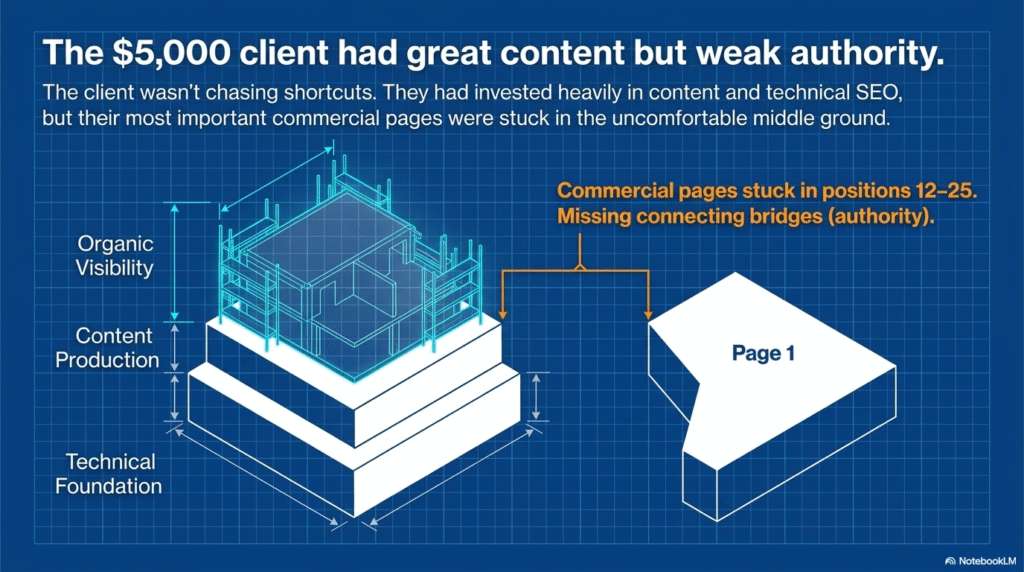
Certain blog posts held their own for longer-tail searches. The pages that actually generated revenue were a different story. Service pages, commercial landing pages, most of them were sitting somewhere between positions 12 and 25. 

Near enough to the first page to feel like a small push would get them there. Far enough away that almost no one was finding them organically.

The reason wasn’t hard to identify once we looked at the competitive landscape. The sites outranking them weren’t doing it with sharper content. 

They had simply accumulated more trust, links from relevant publications, niche sites, and industry resources that had been building over time.

Our client’s backlink profile had a different shape. Links existed, but there wasn’t much logic behind how they’d been built. Some pointed at pages that were already performing reasonably well. Others came from domains with no real connection to the client’s industry. 

The result was a profile that looked active on the surface but wasn’t doing much structural work, something we often see with businesses that rely on a generic link building SEO service rather than a tailored strategy. 

The gap wasn’t volume. It was intent.

A Website That Had Great Content but Weak Authority

What made this project straightforward in one respect was that we didn’t need to fix anything before starting. The content team had already put in the work, useful articles, thorough service pages, topics their audience actually searched for. From a content standpoint, the site was genuinely ready to compete.

The problem was that search engines didn’t have enough external signals to prefer it over more established competitors.

great content but week authority

When two sites offer content of similar quality, Google has to lean on something else to break the tie. Backlinks are still part of how it makes that call. 

Without enough credible, relevant sites pointing to the client’s key pages, climbing for competitive terms wasn’t going to happen through publishing alone. More content would have just meant more pages sitting in the same uncomfortable middle ground.

Why They Decided to Outsource Link Building 

They had tried doing it themselves first. Outreach went out, guest post pitches were sent, a few direct conversations with site owners happened. It wasn’t a complete failure, some things came through, but the pace made it unsustainable.

Relationship-based link building isn’t something you can rush. Identifying the right sites takes time. Getting responses takes longer. Then there’s the content to write, the follow-ups to send, the back-and-forth over placement details. The hours added up faster than their team could absorb them without pulling focus from everything else.

That left a fairly simple decision: keep grinding through a process that was eating resources and moving slowly, or hand it to people who do this specifically.

They went with the second option. The budget was $5,000, and the objective was uncomplicated, build authority where it would actually make a difference, and do it in a way that held up over time rather than producing a short burst of movement that faded, they wanted to avoid cycling through different providers offering affordable SEO link building services without a clear strategy behind the work. 

Where the First Dollars Went (And the Early Mistakes)

The client didn’t throw money at the problem blindly. They approached it the way most reasonable businesses do, researched providers, compared pricing, read through reviews, and made what looked like informed decisions at every step.

Where the First Dollars Went

Early reports gave them reason to feel good about it. New backlinks were showing up, domain authority numbers looked healthy, and things appeared to be moving in the right direction.

Then the question started surfacing in every conversation:

Why weren’t the rankings actually changing?

Once we got into the details of where the budget had gone, the answer became harder to ignore.

Choosing SEO Link Building Service Providers

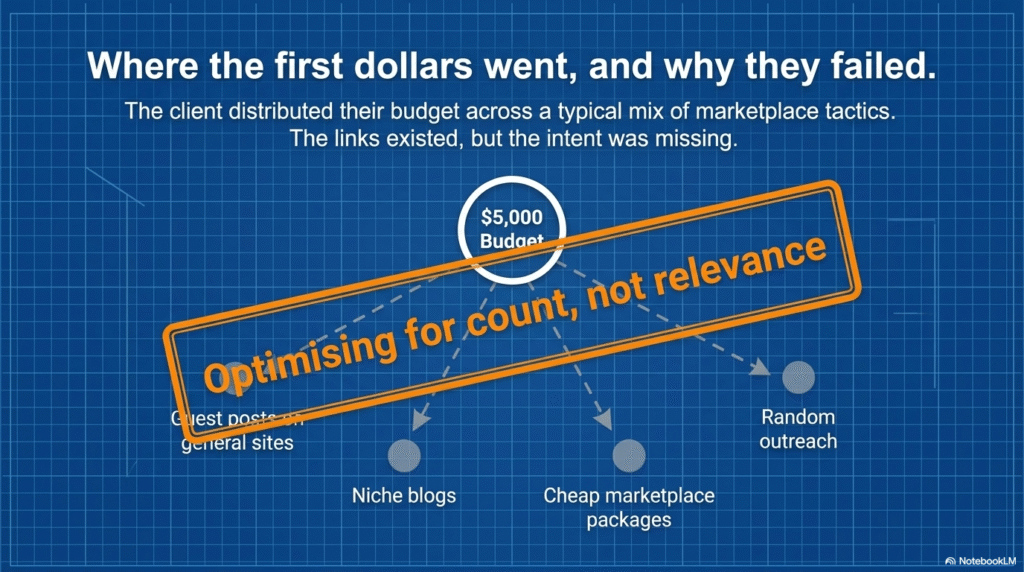
They’d worked with several providers across the campaign, some focused on guest posting services, others running outreach campaigns, a few offering fixed packages with guaranteed placements. None of those approaches are wrong by nature. The issue was that no one was connecting the dots between them.

Each provider was doing their own thing. Without a shared strategy, backlinks were getting acquired based on availability rather than purpose. The links existed. They just weren’t working toward anything in particular.

The Budget Breakdown

Spend ended up distributed across a fairly typical mix of tactics:

  • Guest posts on general-interest websites
  • A handful of niche blog placements
  • Outreach-based link acquisition
  • Lower-cost packages from link marketplaces

Looked at individually, none of these line items seem unreasonable. Looked at together, they tell a different story. The budget had been spread thin across average opportunities when it should have been concentrated on the placements most capable of actually shifting rankings.

What Wasn’t Working

Three things stood out once we went through everything properly.

  • The campaign had been optimizing for link count rather than link relevance. 
  • A lot of the placements came from sites with acceptable authority scores but no meaningful connection to the client’s industry. 
  • And the pages that needed support most, the commercial pages responsible for driving leads, had been largely overlooked. Authority was landing on pages that didn’t need it while the ones that did stayed exposed.

None of this was permanent damage. But it explained clearly why the return hadn’t materialized.

The one thing working in their favor was that the budget wasn’t gone yet. 

With a more strategic approach to link building and SEO services, there was still plenty of opportunity to turn the campaign around. 

Need a Link Building Strategy That Actually Supports Rankings?

Buying more backlinks isn't always the answer. The right strategy starts with understanding which pages deserve authority, which websites are worth earning links from, and how every placement fits into your long-term SEO goals.

How We Changed the Strategy

Understanding where the money had gone was only half the work. What surprised the client wasn’t our analysis , it was our first recommendation.

We told them to stop buying backlinks.

Not permanently. But until there was a clear reason behind every placement, spending more wasn’t going to fix what the previous spend had gotten wrong. 

That’s a mistake we often see with businesses cycling through different SEO link building services without an overarching strategy 

So before anything else moved forward, we went back to basics , audited the existing profile, mapped out which pages had realistic ranking potential, and figured out where the remaining budget would actually do something useful.

Quality Over Quantity

The most significant shift was pulling focus away from volume entirely.

By that point, the client had already seen firsthand that accumulating links doesn’t automatically translate into rankings. So instead of chasing numbers, we got selective. 

Every placement had to come from a site with genuine relevance to their industry , not just a strong domain authority score, but a real editorial connection to the niche. 

That’s the difference between buying backlinks and investing in a strategic SEO link building service.

SEO link building service

We also raised the bar on content quality. A backlink that exists purely for SEO purposes tends to look like one. 

The placements we went after had to make sense for the publication, serve the reader, and sit naturally within the surrounding content. 

Prioritizing the Right Pages

Deciding where links should point turned out to be just as important as deciding where they came from.

Rather than distributing authority across the site broadly, we ran keyword analysis to find the URLs that were already knocking on the door of page one , pages sitting in that frustrating range where a meaningful push could actually get them somewhere. Those became the primary targets.

Commercial landing pages led the priority list. A small set of supporting resources came next, chosen specifically because they reinforced the internal linking structure around those core pages.

The result was a much tighter campaign. Every link had a destination. Every destination had a reason.

Building Links That Actually Made Sense

The biggest change was in how we evaluated opportunities before saying yes to them.

Domain authority stopped being the first question we asked. Instead, the filter looked more like this:

  • Does this site have a genuine connection to the client’s industry?
  • Is the content it publishes original and worth reading?
  • Would this placement look reasonable to someone who had never heard of SEO?
  • Is this a site worth being associated with on its own merits?

That set of questions ruled out a lot of options , and that was exactly the point.

By the end of the campaign, the total link count was lower than what the client had originally anticipated. But what they had was a profile that made sense, with placements that were relevant, credible, and far better positioned to compound in value over time. That’s exactly what businesses should expect from professional link building and SEO services, rather than simply looking for the most affordable SEO link building services available. 

That’s when the shape of the campaign really changed. The metric we were working toward stopped being links acquired and became something harder to game: authority actually earned.

What Happened After 90 Days?

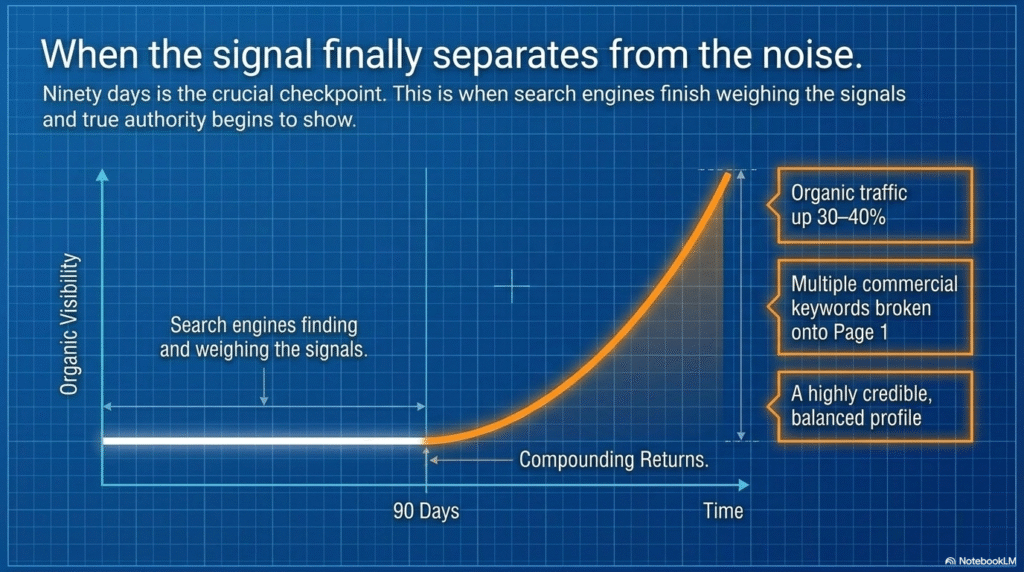
From the start, we were upfront about one thing: even the best SEO link building services don’t produce results the moment links go live. Search engines need time to find them, weigh them, and factor them into how a site gets evaluated. Expecting visible movement in the first few weeks sets up the wrong benchmark entirely.

So ninety days was always the first real checkpoint, not because the campaign would be finished, but because that’s roughly when the signal starts separating from the noise.

seo link building services

Several of the priority keywords had reached the first page. Others had moved meaningfully closer without quite getting there yet. Organic traffic was climbing steadily, and the pages that had received strategic link support were consistently outperforming the ones that hadn’t been part of the campaign.

Against where the site had started, the movement looked like this:

  • Organic traffic up roughly 30–40%
  • Multiple commercial keywords breaking onto page one
  • Broader visibility across related search terms
  • A backlink profile that was more balanced and credible than before
  • Stronger authority on the landing pages that drove most of the business value

But the result that mattered most wasn’t something a dashboard could capture cleanly.

seo tools for digital agencies

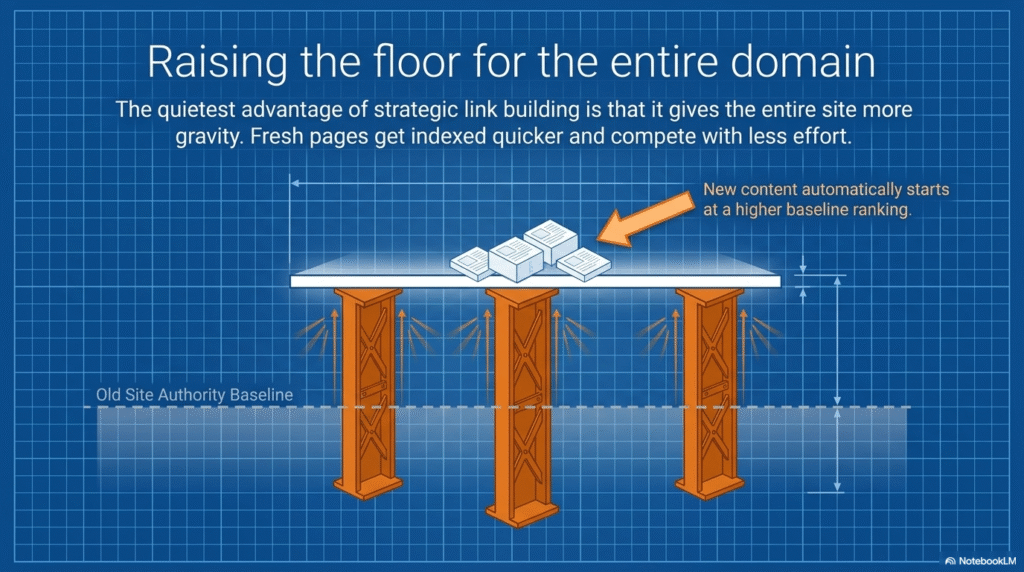
New content started performing faster.

With more domain authority behind the site, fresh pages were getting indexed quicker, picking up visibility sooner, and competing with less effort than they’d needed before. That’s one of the quieter advantages of building links properly, the benefit doesn’t stay contained to the pages you targeted. It raises the floor for everything else the site publishes.

The campaign also confirmed something we come back to often with clients: link building doesn’t work well as a standalone exercise. The gains here came partly from the links themselves, but also from the fact that they were landing on well-structured pages with content worth ranking. Each element reinforced the others.

Looking back, the traffic increase and the ranking improvements were meaningful. But the more durable win was that the client walked away with something to build on, a backlink profile with integrity, a clearer strategy, and a site that was genuinely better positioned than it had been when we started.

That tends to outlast any individual campaign result.

Want Backlinks That Keep Delivering Long After They're Published?

The best backlinks don't just bump rankings for a month—they build the kind of authority that compounds over time. A well-placed link today can still be generating organic growth a year from now.

Which Backlinks Actually Delivered ROI?

Not every link pulled equal weight, and that gap turned out to be one of the more instructive parts of the whole campaign.

The placements that consistently moved the needle shared a recognizable pattern. They came from sites with a genuine connection to the client’s niche. They were published on blogs with real editorial standards, places that actually cared what went on their pages. And they pointed to URLs that already had the underlying potential to rank; they just needed something behind them.

The links that didn’t perform were just as predictable in hindsight. Generic guest posts on broad-topic sites, low-cost packages, placements from domains with no relevance to the industry, these added to the count without adding to the campaign. Rankings didn’t respond to them. Traffic didn’t either.

The lesson isn’t complicated: a small number of well-chosen backlinks will almost always do more than a large number of forgettable ones. Always invest in a professional link building SEO service, the quality of the placements will always matter more than the quantity. 

Should You Outsource SEO Link Building Services?

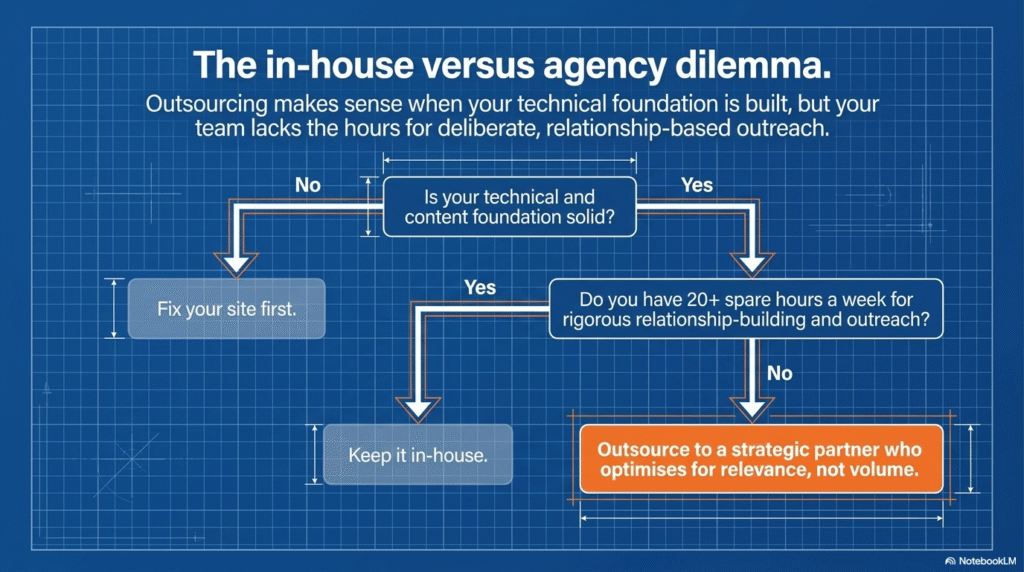
Outsourcing backlinks building starts making sense when the content foundation is already there but the authority to compete for meaningful keywords isn’t. 

Building links properly in-house requires time, consistent outreach, and relationships that take months to develop, most marketing teams don’t have spare capacity for that, and pulling focus from other priorities usually costs more than it saves.

The more important question isn’t whether to outsource. It’s who you hand it to.

in house seo link building agency

What separated the work we did on this campaign wasn’t link volume. It was the process that determined which links were worth pursuing in the first place, keyword analysis before outreach, deliberate page prioritization, and a genuine filter for niche relevance rather than just domain metrics. 

No fixed packages, no chasing numbers for their own sake. Just a clear line between what would build lasting authority and what would only look good in a report.

If you’re evaluating link building and SEO services, the questions worth asking are straightforward: 

  • How does the strategy connect to your actual business goals? 
  • How are individual placements chosen? 
  • Does quality have a real ceiling, or is volume still the primary metric? 

The answers to those questions tend to predict fairly accurately whether the investment holds up over time.

Conclusion

Was the $5,000 worth it?

It was, but not for the reason most people would assume.

It wasn’t the volume of links acquired that made the difference. What turned the campaign around was a shift in thinking: away from link building as a numbers exercise and toward link building as a deliberate, long-term component of SEO.

The results weren’t overnight. Rankings didn’t double in a week, and traffic didn’t spike dramatically in the first month. What happened instead was steadier and more useful, stronger authority on the pages that mattered, better visibility for competitive keywords, and a backlink profile that was actually built to hold up rather than just look good at the end of a reporting period.

The lesson for anyone weighing a similar investment is simple enough. Don’t open the conversation by asking how many backlinks you’ll get. Ask whether they’ll be relevant. Ask whether the strategy connects to real business goals. Ask whether the team you’re working with is optimizing for your long-term growth or just filling a package quota.

A well-directed budget can accomplish more than a much larger one spent without intention. The inverse is also true, the wrong approach can quietly consume serious money without leaving anything behind worth keeping.

At Backlinks Matters, every campaign starts with that distinction in mind. The research comes first, then the targeting, then the outreach, in that order, every time. Because the point was never to build more links than the competition.

It was to build the kind of authority that keeps working long after the campaign is finished.

15 Best Cloud Storage Alternatives for Secure File Sharing in 2026

Whether you are working from a home office, own a startup or are part of a remote team, the need is the same. You need a reliable way to store and share files without worrying about who else can get their hands on them. 

OneDrive, iCloud, Dropbox or Google Drive have been the key players in the Cloud Storage space for many years. In 2026, there are many people asking the right questions like: 

What are the Cloud Storage Alternatives?

Who owns my data? 

Can I trust the platform with sensitive documents?

Are there better cloud storage alternatives that give better control?

The answer is a simple Yes! There are plenty of them in the market today and it may be confusing as to which will be the right one for you. This guide covers 15 Best Cloud Storage Alternatives that are designed with privacy, security and ease of use.

Why Look for Cloud Storage Alternatives?

The biggest names in cloud storage are easy to use, but they come with tradeoffs. Many scan your files to serve ads or improve their own products. Some have dealt with data breaches. Others make it hard to leave once you’re in.

If you share medical records, financial documents, legal files, or sensitive business data, you need more than a household name. The platform should be built with protection as its core. Here are 15 cloud storage alternatives to try. 

1. Proton Drive

Best for: People who take privacy seriously

Your files are locked on your device before they ever reach Proton’s servers. Even Proton cannot open them. The service is based in Switzerland, which has some of the strongest data protection laws in the world.

There is a free plan with 1 GB of storage. Paid plans are fairly priced. The app works well on your desktop as well as on your mobile with an easy-to-navigate interface. All the files and filenames are encrypted and independently audited by Securitum. They are also ISO 27001 and SOC 2 Type II certified. 

2. Tresorit

Best for: Businesses handling sensitive files every day

Not even Tresorit can open your files without your permission. That is the foundation on which the whole service is built. It is the most widely used cloud storage by law firms, hospitals and financial teams across the globe.

You get secure sharing links, the ability to wipe files from lost devices and a full activity log. Plans work for both solo users and larger teams. Tresorit offers the best-in-class encryption and is audited by ETH Zurich, Ernst & Young and Computest. It is one of the top performers in independent adversarial testing.

3. Sync.com

Best for: Simple, private storage and one of the best cloud storage alternatives for small businesses

Sync.com is a Canadian company with servers inside Canada. Every file is encrypted before it leaves your device, so your data stays yours. The free plan gives you 5 GB of storage to start.

Shared links can be password-protected and set to expire on a date you choose. It works well for personal use and small business file sharing alike. SOC 2 Type II and HIPAA BAA are available. Some metadata weaknesses were flagged in the ETH Zurich audit.

Need a Proven Cyber Security SEO Strategy?

Explore our Cyber Security SEO Guide to learn how cybersecurity businesses can improve search visibility, attract qualified leads, and build long-term authority online.

4. Internxt

Best for: Businesses that are looking for open-source and decentralized storage

Internxt splits your business files into small encrypted chunks and spreads them across multiple servers. No single server holds your complete file, which makes it much harder for anyone to get to your data.

The code is open-source, so security researchers can check how it works. It has public audits. You can either go for a free tier plan or a paid one. Paid plans are fairly priced. If transparency is of utmost importance to you, then Internxt is the best fit. 

5. pCloud

Best for: Lifetime storage and large media files; Ideal cloud storage services for photographers

pCloud allows you to pay once and own the storage for life. Choose this option if you do not want to deal with monthly bills. It is a rare option in this market and a great deal if you are looking to stick to the same service long-term. 

It handles photos, videos and large files well. Zero-knowledge is only available with the paid Crypto folder add-on which locks your files on your device before they upload. The rest of your storage is AES-256, but keys are held by pCloud. It runs on Windows, macOS, iOS and Android. 

6. MEGA

Best for: Large free storage and sending big files fast

MEGA gives you 20 GB of free storage right away, more than almost any other service at this price point. All files are encrypted end-to-end and MEGA has no way to read them. It has a public audit. 

It can be a solid choice if you need to move large files in quick time. There is also a built-in chat feature. Paid plans help scale up well for teams that need more storage. 

Note: Ownership history has raised trust concerns for some users.

7. Box

Best for: Enterprise teams in regulated industries

Box is a known name in business file sharing for good reason. It meets HIPAA, GDPR and SOC 2 standards, which makes it a go-to for healthcare, finance and legal teams who cannot afford to get compliance wrong. It connects with Microsoft Office, Google Workspace, Slack and Salesforce.

Box offers managed encryption and it holds the keys. Enterprise customers can bring their own keys (BYOK), but it is not zero-knowledge by default. Pricing sits on the higher end, but the feature set backs it up for larger organizations.

8. Nextcloud

Best for: Full control over where your data lives

Nextcloud lets you run your own cloud storage on your own server. Your data never touches a third-party machine. That is about as much control as you can get. 

It is free to download. You will need a server or a hosting plan to run it, which takes some setup. When self-hosted, you control everything. Third-party-hosted Nextcloud depends on the host’s setup. Calendars, contacts and video calls are built in.

9. Backblaze B2

Best for: Developers and teams storing large amounts of data without spending much

Backblaze B2 stores data at a fraction of what Amazon S3 or Google Cloud Storage charges. It is built for developers, small businesses and content creators who need a lot of storage without a big monthly bill. It offers AES-128 server-side encryption. Backblaze holds the keys. SOC 2 Type II certified but not zero-knowledge.

It is not a drag-and-drop file-sharing tool like Google Drive. It works best with apps like Cyberduck or Rclone. For raw storage at low cost, it is one of the best deals in 2026.

10. Egnyte

Best for: Teams that split work between office servers and the cloud

Egnyte ties your local file servers to cloud storage in one place. It is a practical option for companies that need cloud access but still continue to run files on-site for speed and compliance. Egnyte is not zero-knowledge by default, but supports customer-managed encryption keys via AWS KMS or Azure Key Vault. It is SOC 2, ISO 27001, HIPAA certified.

A lot of construction, media and life sciences businesses use this. You get fine-grained permissions, audit trails and built-in ransomware protection. It is a business tool with business-level pricing.

11. Icedrive

Best for: Clean design and proper privacy for those on a budget

Icedrive is popular for its simple interface and strong security. It uses Twofish zero-knowledge encryption

The free plan gives you 10 GB. Paid plans cost less than most rivals. The desktop app works like a virtual drive you can drag files in and out of. A good pick if you want something simple without compromising on privacy.

Note: ETH Zurich 2024 audit flagged Icedrive for metadata manipulation and file injection risks. Use with caution.

12. Filen and Cryptee

Best for: Users who want end-to-end encrypted storage with zero compromise

Filen is an open-source zero-knowledge encryption cloud storage service based in Germany. Every file, folder name and note is encrypted on your device before it goes anywhere near their servers. Filen cannot read your data. There is a generous free plan and the paid tiers are priced lower than most comparable services. The desktop and mobile apps are clean and fast.

Cryptee takes a slightly different angle. It is built primarily for zero-knowledge encrypted photo storage and document editing. You can write, edit and store documents inside Cryptee without anything leaving your device unencrypted. It is a good option for journalists, researchers and anyone who keeps sensitive notes or personal media that should not be exposed.

Together, these two cover different ends of the privacy storage market: Filen for general file storage and Cryptee for documents and photos.

13. Citrix ShareFile

Best for: Professional services firms that share sensitive client files on a regular basis

Citrix ShareFile is the one for your industry if file security is non-negotiable for you. Mostly attorneys, accountants and healthcare providers use this to send and receive sensitive documents with clients in a safe way. Citrix ShareFile is not zero-knowledge encryption. It has strong compliance (HIPAA, FINRA, SOC 2, SEC), but ShareFile can access your data. It is primarily built for client portals and not for raw encryption.

You can get customizable client portals along with e-signature support and fine-grained access permissions. Pricing reflects the business focus, but for regulated industries, the feature set earns its cost. 

14. Filebase

Best for: Developers who are looking for decentralized storage with a familiar interface

Filebase stores all your data across a decentralized network of providers. You can interact with it through a standard S3-compatible interface. It automatically encrypts all data at rest using AES-256 bit encryption by default. It is not a true zero-knowledge provider. If you require true zero-knowledge, you must encrypt your data before uploading it. 

The best thing about Filebase is that you get the reliability of distributed storage without having to learn a new set of tools. It is priced competitively and works well for static sites, backups and developer projects.

15. SpiderOak One Backup

Best for: Users who need the highest level of file privacy

SpiderOak operates on a strict no-knowledge policy. Every file is encrypted on your own device before it is uploaded. No one at SpiderOak can read your data, not even if you ask them to. 

It is more of a backup tool than a live file-sharing platform, but it does support shared folders and version history. It is a trusted option for people in legal, medical and government work where file confidentiality is not optional.

Note: There is no recovery if you lose your password.

Read More About:- Top Cybersecurity SEO Agencies Guide

Final Thoughts

The best cloud storage alternative is the one that fits how you actually work. Not every business needs military-grade encryption. But every person sharing sensitive files deserves to know that their data is protected.

In 2026, there are a lot of cloud storage options. Take security seriously. Pick a platform that respects your privacy. And do not stay with a service just because it is familiar; better cloud storage alternatives exist and many of them are easier to use than you might think. 

FAQs

What is the best alternative to iCloud storage?

From our vetted-out list, Proton Drive is the one for you. It is fully-encrypted, works on all devices and it cannot access your files. MEGA and Sunc can be your next best alternatives. 

Where can I get 1TB free cloud storage?

Honestly, no legitimate service offers 1TB free in 2026. Realistically, MEGA gives 20 GB, Internxt and Icedrive give 10 GB each. For 1TB without monthly bills, pCloud’s one-time lifetime plan is the closest honest answer.

Is Proton Drive really secure?

Yes, Proton Drive is very secure. Here is why: all your files are encrypted on your device before upload, even Proton cannot read it. It is independently audited by Securitum and is also ISO 27001 and SOC 2 Type II certified. Its geographical presence in Switzerland gives another layer of legal protection. 

Which is the cheapest and best cloud storage?

From the list shared here, Sync.com offers 2TB storage for as less as $8 a month. It also offers zero-knowledge encryption and is the best value. If you prefer a one-time payment option, pCloud can save money in the long-term. Backblaze B2 at $6 per TB a month can be your choice for bulk storage

What is the best free cloud storage option?

If you want to choose the best free cloud storage from the options given above, MEGA offers 20 GB free along with end-to-end encryption. Proton Drive, Internxt and Icedrive also offer free tiers along with strong privacy.


Outsource Backlink Building or Boost Ad Budgets: Finding the Right Marketing Mix

Outsource backlink building and paid advertising; both are beneficial for the business. If one helps generate instant leads, then the other helps build long-term organic growth. Finding the right balance between the two without exceeding the budget is the key to achieving revenue goals while maintaining brand visibility.

Introduction 

Backlinks and paid advertising both seem fascinating for the business. The dilemma begins when you find yourself constantly second-guessing whether to invest in outsourced backlink building or digital advertising to grow your business. 

Both digital marketing strategies have their own pros and cons. You just need to determine when to prioritize outreach vs when to prioritize paid advertising. At the end of the post, you’ll know exactly when to use these strategies for your business. 

Outsource Backlink Building vs. Paid Ads: Understanding the Key Difference

Outsource backlink building and paid advertising are the digital marketing strategies B2B businesses use to drive traffic and achieve desired ROI. Let’s evaluate the key differences to better understand them. 

What is Outsource Backlink Building? 

Outsource backlink building in digital marketing is the process of delegating backlink acquisition to expert link-building service providers. Businesses hire freelancers and agencies that specialize in acquiring inbound links to increase organic visibility and traffic. 

Link-building agencies have industrial connections and expertise that help you secure relevant link placements and improve your website’s authority and organic traffic. It streamlines and accelerates the entire outreach process.

What Is Paid Advertising? 

Paid advertising is the systematic process of buying ad placements on search engines, social media platforms, community forums, and publishers’ websites through reliable advertising networks to reach the target audience at the peak moments and maximize conversions.

Outsourcing Backlink Building and Paid Ads: The Pros and Cons You Can’t Miss… 

Delegating backlink acquisition and running online ads offers numerous benefits for the business. Some of them are listed below:

Outsourcing Backlink Building: Pros and Cons 

Pros  Cons 
You’ve an expert handling the entire link-building process.  It takes longer to show relevant results. 
You can constantly acquire high-authority backlinks.  If the outsource backlink building agency lacks expertise in your niche, you may struggle to acquire premium backlinks.
You can invest your time and efforts in other marketing strategies.  Outbound links may come from low DA sites that add little to no value to your SEO.
You don’t have to train your employees on the best SEO practices.   If the link-building service provider uses black-hat SEO tactics for outreach, you may incur penalties from search engines.
You don’t have to spend hours in the learning or hiring process. Link building through outsourcing requires months of consistent dedication, making it a more expensive digital marketing strategy.

Paid Advertising: Pros and cons 

Pros  Cons 
You can drive traffic to your website the moment you launch your campaigns.  Once you stop investing your budget, the flow of leads and conversions will automatically come to a halt.
You can perform precise targeting to reach the target audience.  In competitive markets like iGaming, finance, and healthcare, and in Tier-1 segments, the cost per click (CPC) tends to be high, which increases the overall cost per acquisition (CPA).
You can choose the actions you want to pay for, such as impressions, clicks, or conversions. Ad fatigue among users increases if frequency capping is not set accurately. 
You can easily find a cost-effective online advertising network based on your needs.  Consumers are increasingly skeptical of paid ads, often viewing them as biased or purely profit-driven. 

When to Prioritize Paid Ads vs. Outsourcing Backlink Building for Maximum Marketing Impact

Evaluate your business objectives, budget, target audience, market competition, and current needs to find the sweet spot and allocate your digital marketing budget precisely. You can prioritize paid ads and outsourced backlink acquisition when you want the following: 

Prioritize Paid Ads When: 

  • You need immediate conversions. 
  • You have a specific audience to target.
  • Your SEO presence is lacking. 
  • You have a dedicated budget for creative testing and optimization. 
  • Your industry keywords are harder to rank with organic SEO. 
  • You have a new business, product, or offer to promote. 
  • You need to run retargeting ads to reduce abandonment rates. 
  • You have dedicated landing pages with ad assets. 
  • You want to capture the audience’s attention with time-sensitive offers for seasonal events.  
  • You’re ready to invest in a self-serve advertising platform. 

Prioritize Outsourcing Backlink Building When: 

  • Your main objective is to build long-term sustainability and have sufficient budget for it. 
  • You want to improve search rankings and domain authority.
  • You have a lot of valuable content for link exchange. 
  • You can articulate, vet, and stay updated with the emerging SEO trends to ensure you’re paying for the right link placements. 
  • You don’t want immediate conversions. 
  • Your selected marketing niche is highly competitive and has high CPCs. 
  • Your SEO has broken down, and you need an expert who can perform white-label SEO techniques. 

Need a Proven Cyber Security SEO Strategy?

Explore our Cyber Security SEO Guide to learn how cybersecurity businesses can improve search visibility, attract qualified leads, and build long-term authority online.

-> Paid advertising is ideal for those targeting quick conversions and short-term traffic goals. You can appear across platforms and moments where your audience spends most of their time to strengthen brand recall, build trust, and generate revenue. 

-> Using link building is like quietly working behind the scenes to achieve long-term stability. Even if you stop allocating budget to the strategy, the earned link placements will continue to drive traffic to your website, helping you attract more potential leads and maintain your domain authority.  

Tip. Focus on strong internal linking, not just outbound links; it will help you engage your acquired traffic for longer and build trust.  Use a performance-driven PPC advertising network that allows daily budget control, scheduling, and postback tracking, such as 7SearchPPC

Find Your Right Marketing Balance! 

Allocate your budget based on your objectives. If you need instant leads and conversions, allocate more budget to paid advertising; otherwise, if you want to improve your organic ranking, traffic, and DA, allocate budget to backlinks. To determine whether the distributed digital marketing budget aligns with your business objectives, you can measure cost-per-action (CPA) and organic traffic growth. 

If your CPA is increasing and organic traffic remains stagnant, it indicates a need to reevaluate and adjust your marketing budget.  

Both strategies complement each other when budgeted thoughtfully. But if you randomly assign your marketing budget to any strategy, you might struggle to achieve the desired outcomes for your business. If needed, you can use both strategies simultaneously to increase conversions and build long-term domain authority.

Frequently Asked Questions (FAQs)

1. What are the effective ways to build outbound backlinks for the business? 

Create a list of websites with moderate to high domain authority and zero spam scores to approach for guest posts, mentions, and direct backlinks, or partner with a reliable outsource backlink building agency.

2. What are the digital marketing strategies that pay off for small businesses? 

Display advertising, SEO (Search Engine Optimization), content marketing, email marketing, social media marketing, white-label link building, and referral marketing are the digital marketing strategies that pay off for small businesses.

3. Should B2B businesses leverage outsource backlink building and paid ads altogether? 

Yes, using both digital marketing strategies is a smart move for B2B businesses, as it helps balance long-term and short-term revenue objectives.

4. What should I consider when choosing between outsourcing backlink building and paid advertising? 

Evaluate your business goals, target audience, budget, market competition, and expected revenue, and determine whether you have an immediate or long-term goal to fulfill.  

5. Should I stop spending ad budget if my SEO starts showing positive results? 

No, not completely. You can reduce your advertising budget during the off-season and gradually increase it for major events to quickly attract high-intent traffic and increase your ROI.

6. What to look for in an outsourced link-building service provider? 

Evaluate their market reputation, white-label SEO packages, pricing, and support availability when choosing your outsourced link-building service provider. 

Why Top Cybersecurity SEO Agencies Combine SEO and Paid Ads for B2B Growth

In high-ticket industries like cybersecurity or SaaS, B2B buyers go through multiple interactions before making a purchase. Paid ads deliver immediate visibility and capture buyers looking for a solution, while SEO builds long-term authority and engages buyers facing problems. This is why top cybersecurity SEO agencies focus on creating content that attracts prospects throughout the buyer journey and helps build trust before a purchase decision is made.

Neither strategy alone is sufficient; paid ads are costly and temporary, while SEO is slow. Combining both creates a powerful funnel that maximizes visibility, builds trust, and generates qualified leads throughout the buyer journey.

High-ticket B2B buyers across industries such as SaaS, cybersecurity, industrial equipment, and healthcare technology don’t make decisions quickly. Most of them spend time researching options, comparing dealers, and seeking proof before making a decision. 

Paid ads can get you in front of these buyers early, but visibility alone rarely builds the trust needed to close complex deals. SEO establishes authority and captures buyers throughout their research journey, but it takes time to deliver results.

Through this blog, you will understand the importance of utilizing both SEO and paid ads, and how combining both can drive success in high-ticket industries. 

The Role of Buyer Intent in Cyber Security SEO

Before diving too deep, it’s important to understand the differences in buyer psychology that necessitate the use of both paid and SEO strategies. Here, we have taken cybersecurity services as an example, which is firmly part of the high-ticket B2B industry. 

The Problem-Aware Buyer

In the digital marketing funnel, this type of buyer knows something is wrong or could go wrong, but hasn’t yet identified the solution they need. Business leaders may read about rising cyberattacks and think, How exposed are we? They’re not yet looking to purchase anything. They’re searching for understanding.

Queries from this buyer look like:

  • How do cyberattacks target financial institutions? 
  • Signs your organization has a security gap

This buyer is not ready to be sold to. They need education, context, and expertise. Here, running a paid ad is unnecessary. What converts them at this stage is powerful content that meets their needs, which is exactly what top cybersecurity SEO agencies are built to deliver. 

The Solution-Aware Buyer

This buyer has done their research. They know the problem and the solution they need, and now they’re actively evaluating service providers. A person who has completed an internal risk audit is searching very differently, for example: 

  • Top cybersecurity companies to invest in
  • Best security compliance software 

This buyer has the intent to purchase. They’re moving fast, and they’re ready to engage. Waiting for organic content to rank for these high-intent terms is too slow. This is where a B2B advertising platform delivers immediate results, keeping your cybersecurity brand right in front of buyers who are actively ready for solutions.

What we gain from this: Top cybersecurity SEO agencies capture buyers who are still forming their understanding. Paid ads capture buyers who have already formed it. 

Need a Proven Cyber Security SEO Strategy?

Explore our Cyber Security SEO Guide to learn how cybersecurity businesses can improve search visibility, attract qualified leads, and build long-term authority online.

Why Paid Ads Alone Are Not Enough 

Paid advertising is effective in reaching the targeted audience and maximizing revenue, making it valuable for reaching high-ticket B2B buyers early in their journey. 

However, relying exclusively on paid ads creates significant limitations that can undermine long-term growth. Here are some of the reasons that help you know why paid ads alone are not sufficient to convert B2B buyers.

1. Most Often it’s Costly

High-ticket industries are expensive to advertise in. If you have ever used paid ads, you know this very well. Keywords in sectors such as cybersecurity, technology, and SaaS are costly because they have high cost-per-click (CPC) rates. 

Even with a cost-effective advertising network, the competitiveness of these niches means your budget is consumed faster than in other niches. 

2. Trust Barriers 

B2B buying is never an impulse-driven process; a company CFO doesn’t click an ad and immediately sign a million-dollar contract. The B2B buying cycle is lengthy and time-consuming, making instant conversions highly unlikely. 

That’s why, in high-ticket industries, advertising plays a crucial role beyond direct conversions. Ads help buyers recognize your brand, trust your business, and feel more confident about buying from you when they’re ready. 

3. Paid Ads Don’t Build Long-Term Assets

The moment you stop spending on advertisements, your visibility and traffic will drop instantly. Unlike content marketing or SEO, which continue to attract leads over time, paid advertising only delivers results while your campaigns are running.

This means growth often depends on a steady advertising budget, making it harder to maintain momentum without ongoing investment.

Why SEO Alone Can Be Too Slow for Revenue Growth

SEO is one of the most effective ways to build long-term visibility, authority, and trust in high-ticket B2B markets. However, relying only on organic traffic can create challenges for businesses that need consistent lead generation and faster revenue growth.

1. Takes Time to Rank for Competitive Keywords

Unlike paid advertising, SEO does not deliver immediate results; it takes time. When investing in SEO, you will never get results instantly for your business. Targeting a competitive keyword like “best cybersecurity solutions for enterprise” could take 6 to 12 months. 

2. Competitive Industries Are Difficult to Rank In

Many high-ticket B2B industries are saturated with established brands that have invested heavily in SEO for years. Competing against these established brands requires effort, resources, and patience.

Even when content is well-optimized, breaking into top search positions can be challenging without strong domain authority.

3. Local Businesses Perform Better on Searches 

Before you go for SEO, keep in mind that whenever a business looks to purchase a product or service, they will always get results near their location. When businesses search for products or services, search engines often display local providers first, especially for location-based queries.

While local SEO can generate highly qualified leads, businesses operating in competitive markets may find it difficult to achieve immediate visibility through organic search alone.

The Strategic Advantage of Combining Paid Ads and SEO

seo vs paid ads

The best thing high-ticket industries can do to convert B2B buyers is to use both paid ads and SEO, as this combination is effective for long-term success. Here are some of the advantages that both paid ads and SEO offer when used strategically. 

Increased Visibility Across Multiple Touchpoints

High-ticket B2B buyers rarely convert after a single interaction. They may click a paid ad, then visit the website, leave to conduct further research on another platform, and return weeks later via an organic search result. 

A high-quality traffic network ensures that the buyers landing on your pages through paid channels are genuinely relevant, making every touchpoint more valuable. By utilizing both paid advertising and organic methods, your brand remains visible throughout the research process. 

Increase Trust and Build Authority

Building credibility among buyers is a very crucial factor, as once done correctly, it will yield long-term success. Buyers are more likely to trust companies they repeatedly encounter across different channels. 

Paid ads help establish visibility instantly. At the same time, SEO strengthens your authority by providing valuable content that buyers can discover during their research process. When businesses see your company appearing in both paid search results and organic rankings, it reinforces your expertise and market presence. 

Generate Higher-Quality Leads

Combining both paid ads and SEO allows businesses to capture leads at different stages of the buyer’s journey. Paid ads can target those actively searching for a solution and engage them to take action, while SEO attracts people seeking information or educational content. 

Both approaches ensure your business reaches potential customers at the awareness, consideration, or decision stage. Always remember that when advertising, look for the perfect PPC advertising solution to drive high-value leads. You can select a PPC advertising network such as 7SearchPPC or Google Ads to achieve better results. 

Maximize Visibility, Generate Qualified Leads, and Drive Sustainable Growth

When combining paid ads and SEO, businesses can stay visible throughout the buyer’s journey, attract more leads, and achieve long-term growth. By integrating paid advertising with niche SEO, companies can create a powerful marketing ecosystem that consistently attracts, nurtures, and converts valuable B2B prospects.

Frequently Asked Questions (FAQs) 

Q1: Which is more effective, paid ads or SEO for promoting b2b business?

Ans: Both are effective in their own terms. Paid ads are best when you want instant results, but if you’re aiming for long-term success or cost effectiveness, then SEO is the perfect choice for that. 

Q2: Which digital advertising network is perfect for running paid ads for promoting cybersecurity? 

Ans: There are many platforms for running paid ads, and choosing the best one is essential. 7SearchPPC and Google Ads are excellent options for successful ad campaigns. 

Q3: Why is advertising so costly when it comes to high-ticket industries? 

Ans: Since these niches are already expensive and highly competitive, the overall CPA is higher. Bids for high-value keywords are typically higher in high-ticket industries than in other niches. 

Q4: How do top cybersecurity SEO agencies offer better lead generation?

Ans: When you choose the best cybersecurity SEO agencies, they help you with better lead generation through creating content tailored to different stages of the buyer journey. They optimize websites for relevant keywords, improve technical SEO, and build authority through industry-focused content.

Q5:Is it beneficial to use both SEO and paid ads for cybersecurity marketing?

Ans: Both SEO and paid ads can be used for cybersecurity marketing, as they are effective for your brand, whether you want immediate results or long-term success.

SEO Poisoning Attacks: Cyber Threat & SEO Defence Guide

Millions of users click the top results without hesitation because search engines are supposed to be safe. But what if we say, it is NOT? Search engines have become the front door to our digital lives. Everything is just one click away, and we trust what we see first on search engines. However, what if we say that the search result you have received is designed to deceive you? SEO poisoning attacks have rapidly increased since the rise of the digital era. It is a cyberattack technique in which cyber attackers aim to disrupt search engine results.

 This activity is done to promote a destructive website. In search poisoning attacks, attackers avoid sending spam emails or phishing messages. Instead, they target users’ trust; they send links to trusted websites like Google and Bing, where people generally react without second thoughts. 

In Search Engine Poisoning attacks, people are asked to enter their legit info and are often redirected to suspicious pages. Often, cyberattackers share links that prompt you to download software that slowly corrupts your system. Hence, Backlink Matters created a comprehensive guide to help you understand, defend, and secure your data. 

What Is SEO Poisoning?

We must understand the issue to fight the problem. Hence, learning about SEO Poisoning is essential before eradicating the cause. In simple terms, search poisoning is a cyberattack in which search engine results are manipulated. 

In SEO poisoning attacks, cyberattackers send you links rather than emails or phishing messages. These links lead to a page where they might collect your personal info and use it for their own benefit. They might often use websites with weak security as backdoors to manipulate search results.

They might use methods such as keyword stuffing and targeting, or compromised websites, typosquatting, or cloaking to mislead users. No matter which search engine poisoning method they choose, the goal is simply to exploit search engine results.

By using Back Hat SEO techniques, cyber attackers employ deceptive methods to artificially boost a website’s ranking. This manipulation of SEO positioning is usually done by violating search engine guidelines. A few common techniques to manipulate SEO rankings are CTR manipulation, Doorway pages, Parasite SEO, and sneaky redirects.

SEO Poisoning vs Phishing vs Malvertising vs Typosquatting

SEO Poisoning vs Phishing vs Malvertising vs Typosquatting

  • SEO POISONING: Before moving ahead with a detailed study, let’s take a quick look at a few terms that might be similar for some but do differ. An SEO poisoning attack is the manipulation of search engine results using Black Hat methods. Here, cyber attackers try to boost a website’s search results using unethical methods.
  • Phishing: It is an old-school method in which cyberattackers send spam emails and messages asking you for your personal information. Cyber attackers send links and messages pretending to be from reputable websites. They leverage the trust to ask for private details.
  • Malvertising: It is a method in which cyberattackers embed harmful code into a legitimate website ad. Once you click a link or an ad, it can slowly spread malware and steal your personal information.  
  • Typosquatting: Also known as URL hijacking, it is a method in which attackers create confusion by misspelling a website’s name or registering a similar domain to trick users. These fake websites are termed as sting sites or cousin domains. These sites help the attackers steal all your data and spread malware.

Common SEO Poisoning Techniques

SEO Poisoning attacks can be done in various ways. Let’s take note of a few popular methods that attackers use to create a search engine poisoning attack.

Keyword Stuffing: Attackers use trending search terms such as ‘free software download’ or ‘login pages’ to lure users into clicking links.

Compromised Websites: Cyber attackers might even exploit users’ trust. They might find a vulnerable website or embed malware on a trusted website to target users. Just a click, and users will be in their trap, manipulated into successfully manipulating search results.

Cloaking: It is a deceptive method in which search engine crawlers or bots are shown a different page than humans are shown. It helps them create a different picture for users, which boosts their ranking.

Typosquatting: Cyber attackers use this method to exploit misspelled or similar domain names to confuse users. Users are misled to a page where they might lose their personal information or important data.

Link Farm: Another technique to confuse or mislead users by interlinking many fake websites. With this method, they try to boost the authority of the tampered website.

How SEO Poisoning Attacks Users & Businesses?

  • Method of Keyword Stuffing and Black-Hat SEO Tactics: This is a method in which cyber attackers use unnatural repetition of keywords in content or meta tags to manipulate search engines. This method spoils the user experience and violates the search engine’s guidelines. This violation may ruin the website’s reputation, lead to a penalty, or lower its ranking.
  • Brief Discussion About Cloaking Techniques: It is a method in which cyber attackers serve different content to search engine crawlers or bots than to humans. It is a black hat technique that helps them manipulate search engine results. As the name suggests, the attackers hide the page behind another page and try to manipulate rankings and sabotage the website’s reputation.  
  • Exploiting Trusted Platforms Like Google Search Results: Another way to search engine poison is to mislead users into submitting information to a trusted platform. For example, they might use SEO poisoning MITRE framework, or the Google search engine as a cover to misadvertise and lure users. Here, they ask users to click links or ads, then request their details. SEO poisoning attacks might also introduce malware into your system or device via this method.

Real World Impact of Search Engine Poisoning

  • Credential theft or Data Breach: One of the prominent impacts of SEO poisoning is a data breach. Cyber attackers invade your privacy and steal your personal information. In some cases, they hack your bank details and do frauds. They might also share or misuse the personal information or access your online accounts.
  • Ransomware: Search poisoning also poses a risk of ransomware. It is often delivered through phishing emails or compromised websites. Here, users are tricked into opening or downloading infected files. This malware steals your private details or credentials.
  • Cyber Crimes or Online Phishing: we can say that cybercrime is a criminal activity that occurs online via devices like phones, laptops, PC. It covers crimes such as identity theft, banking fraud, and data theft. Within cybercrime, phishing is a common issue, as most users are tricked by it. In phishing, users are often lured by deceptive messages, emails, and links to share their information. Cyber attackers impersonate reputable platforms and trick users into sharing sensitive information.
  • Financial Losses: SEO poisoning attacks often lead to financial losses, as cybercriminals use the information to steal money. Cyber attackers use malicious methods to steal information and identity details, which leads to financial fraud.
  • Heavy Regulatory Penalties: After cyber attackers use Search engine poisoning methods, a website may lose credibility, leading to severe penalties. Any breach of search engine regulations will result in severe penalties.

Types Of Cyber Attacks:

  • Fake Login Pages: Recently, cyberattacks have seen a major increase in credential harvesting. They trick users into clicking on malicious links or downloading infected files, and eventually hack into all their accounts. They mask their malicious software under the name of trusted brands, and users fall for their trick. They often sign up for pages that require them to share their details.
  • Malicious Ads: These ads often appear on the pages of trusted websites where users simply fill in their information or click on it. Sometimes a simple click might give them access to all your credentials.
  • Software Downloads: Another way of an SEO poisoning attack is to introduce them. Users are shown or advised to download certain software that is infected with malware. Cybercriminals trick them into clicking on downloads and gain access to all their information.

How Cyber Security SEO Helps Defend Against SEO Poisoning?

Cyber security SEO, as ethical search engine poisoning strengthens security protocols, which eventually builds user trust. They create high-quality, understandable content, which also boosts users’ confidence. It is a simple white-hat technique that enhances user trust and keeps them from being manipulated. Content authenticity, a user-centric approach, and the prevention of negative SEO are a few elements that help mitigate search poisoning. Including them will enhance a website’s security and help maintain its reputation. Having a trusted platform will surely attract more users and help prevent search poisoning in cybersecurity.

Why SEO Poisoning Is Increasing In 2026?

  • Remote Working: SEO poisoning is on the rise, and its primary target is work-from-home employees. They trick remote workers and leverage their trust to trust certain platforms. Employees who rely on search engines for research and downloading are often targeted by SEO poisoning attackers.
  • Too Much Reliance on AI-Generated Content: Cyber attackers are using AI to generate large volumes of keyword-centric content and tamper with search results. They usually automatically redirect users to malware or phishing links.
  • Too Much Competition In Search Rankings: To rank higher, cybercriminals often take shortcuts by using Black-Hat methods to boost rankings.

SEO Poisoning Detection & Prevention Techniques

If you are looking for how to prevent SEO poisoning attacks, you need to understand the defense and detention techniques below:

  • White-Hat Optimization or Ethical Practices: It builds a strong and secure platform. The content is transparent and easy to understand, which builds trust with users.  
  • Regularly Monitoring Search Engine Results: Regular monitoring will help prevent technical issues such as broken links or indexing errors. It will also keep an eye on the ranking and help in maintaining it.
  • Threat Intelligence Integration: It equips your security team to detect and combat security threats and move from a reactive to a proactive posture.
  • Performing Regular Site Audits: This SEO poisoning trick ensures the immediate eradication of security issues, keeping the site safe and fast for users.

Preventions Organizations Can Take To Keep SEO Poisoning Risk At Bay

  • Collaborate with SEO & Cybersecurity Teams: To keep your site safe and secure, collaborate with SEO and cybersecurity teams. They ensure there are no vulnerabilities and that your website is safe and user-friendly.
  • Train Employees About Phishing Risks: Often, traditional security tools don’t work out. Employees often face the risk of search engine poisoning when they trust search engine platforms; training them is recommended.  
  • Regularly Monitor Search Results To Maintain Your Brand Name: Regularly checking search results will help keep technical issues at bay and build user trust in your brand.
  • No Harm In Investing in Some Cyber Threat Detection Tools: Users, especially remote employees, are often at risk of SEO poisoning attacks, so investing in a cyber threat detection tool is a good option.

Conclusion: Staying Protected In Evolving Threat Landscape 

In the article above, we discussed the recent threat of SEO poisoning attacks, how to fix SEO poisoning, and the reasons they may occur. Additionally, we have discussed ways to address them and the importance of training employees on this matter. At Backlink Matters, we also recommend collaborating with a cybersecurity SEO to ensure your data is fully protected.

Complete Guide to SEO Audit Services and Why Your Company Needs Them in 2026

You can publish content every week, fix a few keywords, even build backlinks, and still wonder why your site is not moving up in rankings. That is usually the moment when people realize something deeper is off. You cannot fix what you have not properly examined. That is where SEO Audit Services come in.

Professional SEO Audit Services do more than point out obvious errors. 

It provides a detailed overview of your technical setup, content quality, user experience, and many more things, helping you to find the real reason behind traffic drops 

Search engines change constantly. Competitors improve their strategies. Pages get outdated. Links break. 

Without Regular audit work, small issues pile up and slowly drag your SERP ranking down. Seo Audit Services help you identify these problems, and prioritize on things that need instant improvement.

What Are SEO Audit Services and Why Your Company Needs Them

If you want predictable organic growth, you need more than content and keywords. You need clarity.  Seo Audit Services gives you clarity, they give you a structured backend evaluation supported by data on how your website performs in search engines and where you lack.

seo audit funnel

Seo audit services are a complete analysis of three main areas: technical seo audit seo services, on-page content, and backlinks. Each of these directly affects how search engines crawl and understand your site to rank it accordingly

1. Technical SEO Audit Services

Search engines want clean structure and accessibility, and a professional audit checks things like index status of your pages, site speed, core web vitals, mobile friendliness, internal linking, and duplicate content.

If search engines cannot properly access or identify your pages, your ranking goes down, no matter how good your content is. Technical findings are also very important; they are usually backed by data from tools such as Google Search Console (GSC), Google Analytics (GA4), and by a specific crawling software.

2. Content and On-Page Evaluation

Content Evaluation is not just for keywords, but also for search intent. You must evaluate the depth of content, accuracy, and usefulness in the actual market. Strong seo auditing services  assess things like these in a detailed manner, and some of them are listed below

  • If your page is providing infor of what users are actually searching for or not
  • Keyword cannibalization issues
  • Lacking depth or outdated content
  • Meta titles and descriptions
  • Internal linking flow
  • Content hierarchy and readability

Search engines always prioritize content that is helpful and trustworthy, via E-E-A-T guidelines. E-E-A-T stands for experience, expertise, authoritativeness, and trust.

An seo audit checks if your pages lack the expertise or authority as per EEAT guidelines.

It also shows opportunities to improve high-performing pages and low-performing content.

3. Backlink and Authority Review

Backlinks are still a major ranking factor in 2026. SEO audits check in detail which domains you are referring to, the quality and distribution of your backlinks, and the anchor text and signals that matter for overall authority.

Low-quality links or links placed to manipulate rankings can harm your credibility in the long term, while strong, relevant backlinks increase trust.

A proper, detailed backlink review protects your domain and helps you prepare the best backlink building strategy.

4. Regular Audits Matter

Algorithms for searches are always changing. Competitors make improvements to their websites. As platforms change and content expands over time, technical problems arise. Without regular SEO audit services, issues worsen covertly and reduce your visibility.

Regular audits help you:

  • Detect ranking drops early
  • Recover from penalties or algorithm impacts
  • Improve user experience and site performance
  • Align content with current search intent
  • Prioritize actions based on impact

In terms of experience and expertise, the benefit of SEO Audit Services is that it helps to convert random data into actionable steps. Rather than carrying out random search engine optimization, you get to work with organized information that is informed by actual data.

For businesses that depend on organic traffic, this approach helps to mitigate risks while also ensuring that their position as a leader is maintained.

How SEO Audit Services Improve Rankings and Organic Traffic

Improving rankings is rarely about one big change. Usually, growth comes from identifying specific weaknesses, fixing them step by step, and focusing on what already works. This is how SEO Audit Services create measurable improvements in rankings and organic traffic

1. Turning Data Into Clear Actions

Professional SEO Audit Services depend on real performance data from sources like Google Search Console, analytics platforms, crawl reports, and ranking tools. Instead of guessing why traffic dropped, audits examine patterns. 

For instance, if a page gets 20,000 impressions per month but has a 1 percent click-through rate, the problem might not be ranking but poorly written meta titles or descriptions. According to industry studies, improving title tags can raise organic CTR by 5 to 20 percent depending on the niche. 

Small changes in snippets can lead to hundreds or even thousands of extra visits each month without affecting rankings.

Real-World Example

Take, for example, an eCommerce site that saw a 30 percent decline in organic search traffic over a period of three months. An in-depth SEO analysis identified the following key issues:

  • There were multiple product category pages that were accidentally set to noindex
  • The mobile page load times were causing Core Web Vitals to fall below best practices
  • There were several high-authority backlinks pointing to outdated redirected URLs

Once these issues were addressed, the site saw a restoration of traffic in eight weeks. Organic traffic saw a 42 percent increase from the nadir, and several category pages moved from positions 9-11 to the top five positions.

Such a restoration is not an isolated incident. Research indicates that fixing technical issues and consolidating duplicate URLs can have a profound impact on crawl efficiency, particularly on medium to large-scale sites.

2. Fixing Hidden Ranking Barriers

Some ranking obstacles are structural in nature. A website may inadvertently target the same keyword. Key pages may not have internal links from high-authority sections. Thin pages may weaken the overall domain quality.

SEO Audit Services can remove these obstacles and allow search engines to easily recognize which pages are most relevant. When internal linking is done correctly, some websites experience improved rankings without adding a single backlink.

3. Uncovering Growth Opportunities

Opportunity zones are also revealed through audits. For instance, studies have found that pages ranking between positions 8 and 15 are the easiest to move into the top five through optimization. A targeted update that enhances content depth, search intent, and internal linking can drive traffic dramatically because the top five positions account for the majority of clicks.

In fact, the first result on Google gets an average of 25 to 30 percent of all clicks, while positions further down on page one get significantly fewer clicks. Moving up a few positions can double or triple traffic for that keyword.

4. Aligning With Algorithm Updates

Google’s updates are increasingly favoring helpful, trustworthy, and technically sound websites. Websites that ignore user experience and have poor authority signals tend to be volatile after core updates.

SEO Audit Services assess whether your website meets these expectations by analyzing the quality of content, authority signals, performance metrics, and the health of the website structure. This approach helps prevent sudden drops in traffic and helps with steady growth.

Ok, but how do you track each update of Google’s algorithms? Well, you can use semrush sensor tool to track these updates.

But if you want a simple, cost-effective way, then

Here is a page by Search Engine Central to see the most recent algorithm updates by Google

Signs Your Business Needs SEO Audit Services

Not all websites require a complete overhaul. Sometimes, all a website needs is some clarity. The problem is figuring out whether your SEO issues are just temporary or if they are indicative of deeper structural issues.

The following are signs that your business needs SEO Audit Services.

1. Sudden or Gradual Traffic Drops

If your organic traffic starts dropping without any apparent reason, that’s a warning sign. A sudden drop in traffic may be due to technical issues, algorithm changes, manual penalties, or indexing problems. A steady drop in traffic may be due to increased competition, outdated content, or loss of authority signals.

If your analytics tools are showing a steady drop in traffic for a few weeks or months, it’s time to start investigating instead of just speculating.

2. Rankings Are Stuck or Declining

You are regularly publishing content but your target keywords are stuck on page two or three. Or, worse, they are declining.

This is a sign that something is holding back your performance. It could be internal competition, poor topical representation, misalignment with search intent, or superior competitors. Our SEO Audit Services will help you understand why your pages are not ranking in the top spots.

3. High Traffic but Low Conversions

In some cases, the traffic may be stable, but the leads or sales may not be improving. This indicates that there may be a misalignment between the user intent and the content, a lack of strong internal linking, or a poor page experience.

An audit may help determine if users are visiting the wrong pages, if the calls to action are hidden, or if the technical issues are impacting the usability. Organic traffic is relevant only if it is driving business results.

4. Slow Site Speed or Poor Mobile Experience

If your website is perceived as slow, users will notice. Search engines will too.

Bounce rates, dwell time, and mobile engagement are often associated with slow websites. With Google’s mobile-first indexing and emphasis on user experience, slow websites can negatively impact rankings without you even realizing it.

5. Indexing or Crawl Issues

If key pages are not showing up in search results or if there are crawl errors, excluded pages, or coverage issues in Google Search Console, there could be underlying structural issues.

Indexing problems make it impossible for search engines to fully understand your site. Without visibility, quality content cannot rank.

6. You Have Never Done a Formal Audit

Many companies are spending money on SEO without ever doing a review. If you have been creating content and building links for years without doing a review of the system as a whole, there is a good chance that inefficiencies are present.

SEO becomes more complicated as the size of the site increases. What was effective on your site with 50 pages may not be effective on your site with 500 pages.

How to Choose the Right SEO Audit Company

Now comes the important part, How to choose the right seo audit company. The right seo audit company will identify real problems, prioritize them correctly, and help with implementation.

This is how to rate your choices.

1. Proven Experience and Industry Understanding

Begin with experience. A good provider should have knowledge of various business models, types of search intent, and competitive scenarios. Inquire about the industries they have experience in and the types of websites they audit.

SEO is not a one-size-fits-all solution. The requirements of a startup blog are different from that of a SaaS business or an enterprise website.

2. Enterprise SEO Audit for Large-Scale Websites

If you are running a large website with hundreds or thousands of pages, you will require an enterprise SEO audit.

Enterprise SEO audits target crawl efficiency, log file analysis, scalable internal linking, structured data consistency, international SEO issues, and site architecture management.

Large-scale websites tend to have crawl budget waste and duplicate signals. An enterprise SEO audit will make sure that search engines rank your most valuable pages.

3. B2B SEO Audit for Long Sales Cycles

A B2B SEO audit needs a different perspective. B2B buyers have longer decision paths and may be searching for information before making contact.

A good B2B SEO audit looks at the depth of content, authority positioning, alignment with keyword intent, and lead-driven landing pages. It needs to examine how well your content is working to build trust and thought leadership, as opposed to purely driving traffic.

4. Transparent Reporting and Clear Documentation

Professional seo auditing services should include a structured SEO audit report template so you know how findings are organized. Request an SEO audit report sample before hiring.

Reports should clearly outline:

  • Identified issues
  • Business impact
  • Priority level
  • Step-by-step recommendations

Transparency shows confidence and accountability.

5. White Label SEO Audit for Agencies

If you are running a marketing agency or a consultancy business, a white label SEO audit can be an excellent solution for you.

With a white label SEO audit, you can offer Professional seo auditing services with your own branding while benefiting from the expertise of a white label SEO audit provider in the background. A reliable white label SEO audit provider will offer you in-depth reports and insights that you can present to your clients with confidence.

6. Proven Results and Case Studies

Finally, look for evidence. 

Have they assisted clients in recovering from traffic losses? 

Have they improved search rankings? 

Have they increased qualified leads?

A company such as backlinksmatters.com, for instance, is one that specializes in authority-driven strategies and structured audits that identify not only technical issues but also competitive gaps. What is most important, however, is not only the identification of issues but also the demonstration of how recommendations resulted in improvements.

Conclusion

SEO improvement does not result from speculation. It results from understanding. Even with regular content and link development, things can go wrong if there are technical problems, authority issues, or content mismatches.

Seo auditing services are a systematic and data-driven analysis process that reveals hidden problems and points to actual opportunities for growth. They can help you prioritize, adjust to changes in the algorithm, and safeguard your rankings before small problems turn into big losses.

For any business that relies on organic search traffic, regular audits are not a recommendation. They are a necessity.

How to Choose the Right SaaS SEO Agency in 2026: A Complete Guide for B2B SaaS Companies

In 2026, SEO isn’t just about getting keywords rank at the top of the search results. It’s about how signals such as structure, authority, clarity, and trust are now interpreted across search engines, how AI search makes your business more visible, how it grows your business through products, and how to use a full-funnel strategy. Choosing the right SaaS SEO agency can directly influence your pipeline, CAC, and long-term growth.

Why Do B2B SaaS Companies Need a Specialized SaaS SEO Agency?

B2B SaaS companies operate in a very different environment compared to eCommerce, local businesses, or traditional B2B services.  That’s why working with a specialized SaaS SEO agency isn’t just helpful, it’s often necessary for scalable growth.

SEO is not a one-size-fits-all strategy. The approach that works for a traditional business (like a local store, manufacturer, or service company) is very different from what works for a SaaS (Software as a Service) company.

B2B SaaS companies need a specialized SaaS SEO agency because of the following reasons:

  • A SaaS SEO agency tracks SEO performance against monthly recurring revenue, customer lifetime value, customer acquisition cost, and sales qualified leads, to make sure that organic traffic directly contributes to maintaining and increasing the recurring revenue.
  • To help prospects move seamlessly from research to demo or trial, they develop structured content for the awareness, comparison, alternative, integration, and BOFU stages.
  • SEO content is designed to inform, develop, and influence over time because B2B SaaS buyers conduct in-depth research and involve a number of decision-makers.
  • To guarantee appropriate indexing and visibility, they oversee intricate SaaS architectures such as feature pages, dynamic templates, app subdomains, and crawl budgets.
  • To compete with well-funded SaaS rivals and prominent review sites like G2 and Capterra, they create content that is intent-driven and authority-driven.
  • They turn customer FAQs, feature updates, integrations, and sales objections into high-intent SEO assets that encourage conversions.
  • They build an organic growth engine for compounding, long-term results using programmatic SEO, internal linking systems, and content clusters.

What Does a SaaS SEO Agency Actually Do?

SaaS SEO agencies work beyond the keywords targeting and content publishing. It creates a business designed for organic growth by generating qualified leads, demo bookings, and recurring revenue for subscription-based software businesses.

Unlike traditional SEO firms, it aligns content, technical SEO, product positioning, and revenue metrics to support the full B2B buyer journey from awareness to conversion and retention.

The Main Functions of a SaaS SEO Agency:

  • Creates an SEO Strategy Based on Revenue

links SEO efforts to pipeline, MRR, LTV, and CAC objectives rather than just traffic growth.

  • carries out in-depth keyword and intent research

finds comparison, integration, product-led, and high-intent keywords that draw in decision-makers as well as readers.

  • Produces Content for the Whole Funnel

creates BOFU landing pages, feature pages, use-case pages, comparison pages, “vs” pages, and awareness blogs to promote trials and demos.

  • Enhances SaaS Architecture Technical SEO

controls indexation, crawl budget, product templates, dynamic pages, app subdomains, and structured internal linking.

  • Increases Backlinks and Authority

acquires topical authority and high-quality backlinks to rival review sites like G2 and Capterra.

  • Develops Scalable and Programmatic SEO Systems

creates scalable landing page frameworks to promote compounding organic growth for use cases, locations, industries, and integrations.

  • Assists Sales and Product Teams

converts sales objections, product updates, and customer frequently asked questions into optimized content that accelerates the sales cycle.

  • Monitors Performance Using Revenue Measures

evaluates performance using more than just rankings or impressions; it also looks at pipeline contributions, revenue impact, demos, and SQLs.

Core Functions of a SaaS SEO Agency: Strategy, Content, Technical & Conversion Framework

functions of saas seo agency

Revenue-Oriented Keyword Approach

  • Targeting high-intent keywords that have a direct impact on demos, trials, and MRR (Monthly Recurring Revenue) rather than merely increasing sessions is known as the revenue-focused keyword strategy.
  • Keywords that are organized by funnel stage include BOFU (purchase intent), MOFU (solution evaluation), and TOFU (problem awareness) in order to direct users toward conversion.
  • Comparison pages, such as “X vs. Y,” are strategically created to attract high-intent traffic and buyers who are actively assessing competitors.
  • Alternative Pages: aims to attract unhappy rival users by focusing on “Best alternatives to X” searches.
  • In order to draw in solution-conscious prospects, feature-led SEO content creates SEO pages centered on the main features, advantages, and integrations of the product.

Content Strategy for SaaS

  • To increase topical authority and boost rankings, the Pillar + Cluster Model creates reputable pillar pages backed by interconnected cluster content.
  • Product-Led SEO aims to naturally direct traffic toward signups and demos by aligning content with product features and use cases.
  • Bottom-of-Funnel Landing Pages: These optimize high-intent pages that are centered around pricing, demos, trials, and solution-based queries.
  • Use Case Pages: These pages are tailored to a particular industry and role in order to draw in qualified leads who are looking for customized solutions.

Technical SEO for SaaS Websites

  • Site Structure for Scaling: To facilitate future growth and programmatic expansion, a logical, scalable URL and internal linking structure are designed.
  • In order to make sure search engines give priority to high-value pages, crawl optimization controls crawl budget, indexation, and technical directives.
  • Managing Dynamic Pages: Enhances template-driven and dynamically produced pages (such as industry pages or integrations) for appropriate indexation.
  • Core Web Vitals: Enhances user experience and rankings by improving site speed, stability, and performance.

Conversion Optimization

  • Demo Page Optimisation: Improves demo landing pages by adding trust signals, CTAs, compelling messaging, and reducing friction.
  • Trial Signups: Enhances signup and onboarding processes to boost the number of people who activate free trials.
  • Lead Magnet Offers: Captures and develops qualified leads through the use of gated resources (eBooks, templates, webinars).
  • Attribution tracking accurately measures the impact of demos, SQLs, and revenue by integrating SEO performance with CRM and analytics tools.

Key Traits of the Right SaaS SEO Agency

A right SaaS SEO agency provides a clear 6-12 month roadmap, laying out the full plan to ensure you’re in good hands. You’ll see real results in their work. They will not make false promises regarding instant results or vague growth over time. Instead, the right SaaS SEO agency will ensure you by showing similar SaaS clients’ case studies with real revenue impact, like increased qualified leads or pipeline growth, rather than just vanity metrics such as raw traffic.

Non-Negotiable Traits of B2B SaaS SEO Agency:

1. Proven B2B SaaS Case Studies

Reputable SaaS SEO firms need to display actual outcomes from other B2B SaaS businesses.

They are required to give evidence of:

  • Growth in natural traffic.
  • Increase in demo requests.
  • More people signed up for free trials.
  • A rise in Monthly Recurring Revenue.
  • Pipeline expansion from natural search

It is insufficient for an agency to display traffic screenshots with no effect on revenue.

A proficient B2B SaaS SEO firm links SEO initiatives to commercial outcomes.

2. Understanding of CAC, LTV & MRR

SaaS companies are supposed to understand the following matrices: 

  • CAC (Customer Acquisition Cost): The cost required to acquire a customer.
  • LTV (Lifetime Value): To understand how much revenue is generated per customer over time.

  • MRR (Monthly Recurring Revenue): To understand predictable recurring income.

The right SaaS SEO agency understands how SEO helps to:

  • Reduce CAC by lowering paid ad dependency

  • Increase LTV by targeting high-intent users

  • Grow recurring revenue through organic acquisition

If the agency talks only about rankings and backlinks, they may not understand SaaS growth.

3. Revenue Reporting, Not Just Rankings

Many agencies focus on Keyword rankings, Traffic increase, and Domain authority. But the best SaaS SEO agencies report Organic demo conversions, Trial signups, Sales-qualified leads (SQLs,) and Revenue influenced by SEO

Rankings are important, but revenue is the real goal.

Your SEO agency for SaaS should track performance from keyword → traffic → demo → revenue.

4. Strong Content and Technical SEO Team

SaaS websites are often complex. They include:

  • Product pages

  • Use case pages

  • Feature pages

  • Integration pages

  • Comparison pages

A strong SaaS SEO agency must have:

  • Content strategists

  • Technical SEO experts

  • SaaS-focused writers

  • Experience with structured site architecture

Content without technical SEO will not rank. Technical SEO without strong content will not convert.

You need both.

5. Transparent Process and Clear Communication

The right SaaS SEO agency works with transparency.

They should provide:

  • A clear strategy

  • Monthly deliverables

  • Regular reporting

  • Clear KPIs

  • Ongoing performance updates

You should always know what work is being done and how it supports your SaaS growth.

6. Clear 6–12 Month SEO Roadmap

For SaaS businesses, SEO takes time. A competent SaaS SEO company will offer a detailed roadmap for the next six to twelve months.

This roadmap ought to comprise:

Months 1-2: 

  • Audit of the website
  • Research on competitors
  • Strategy for keywords
  • Technical solutions

Months 3–6: 

  • Release content at the bottom of the funnel
  • Make product pages more efficient.
  • Begin constructing links.
  • Scale content clusters in months six through twelve
  • Establish authority
  • Boost conversion rates
  • Investing in SEO takes time. There is no clear direction in the absence of a roadmap.

Best SaaS SEO Agencies in the US

Backlinks Matters: For White Label Link Building

backlinksmatters the backlink building agency

Backlinks Matters is a dedicated link building and SEO services agency focused on helping businesses improve their search engine visibility and organic rankings through high-quality backlink acquisition, outreach, and content marketing.

They have specialization in building relevant, permanent do-follow backlinks that strengthen domain authority and drive sustainable traffic growth.

Their Services include:

  • Seo Outreach 
  • White label link building
  • Niche edit service
  • Keyword research service
  • Guest Posting Service
  • Blogger outreach service
  • Link building service
  • In-house link-building service
  • Outsource link building service

Apart from these services, they offer customized SEO packages as per the client’s requirements.

TrustPilot Ratings: 4.0 / 5

TripleDart: For Revenue-Driven SaaS Marketing

tripledart

TripleDart is a B2B SaaS SEO company that uses performance-driven SEO, content, and demand-generation tactics to produce quantifiable outcomes.

They specialize in building scalable organic acquisition systems that align SEO with product positioning, sales funnel stages, and revenue metrics like MRR and pipeline contribution.

Their Services include:

  • SaaS SEO strategy
  • Content marketing for SaaS
  • Product-led growth marketing
  • Demand generation
  • Paid media for SaaS
  • SEO + Content integration
  • Conversion-focused landing pages
  • Marketing analytics & attribution

Apart from these services, they offer customized SaaS growth frameworks tailored to different funding stages

Trustpilot Ratings: 4.8 / 5

Quoleady: SaaS Content Marketing Agency

quoleady

Quoleady is a SaaS-focused SEO and content marketing agency that uses authority backlinks and thoughtful, outstanding content to help software companies scale organic growth.

They specialize in thought-leadership content, data-driven link building, and SEO content strategies that attract high-intent traffic and support long sales cycles typical in B2B SaaS.

Their Services include:

  • SaaS SEO
  • Content strategy development
  • SEO blog writing
  • White-hat link building
  • Guest posting
  • Digital PR
  • Content repurposing
  • Landing page optimization

Apart from these services, they provide tailored content marketing programs designed specifically for SaaS startups and scaling tech companies.

Trustpilot Ratings: 4.9 / 5

How Long Does SaaS SEO Take to Show Results?

There is no magic trick to get instant results. SaaS SEO is a long-term growth strategy; it requires time to build authority,  improve rankings, and earn trust from search engines. Typically, SaaS companies begin seeing early signs of progress within 3 to 6 months, while meaningful pipeline and revenue impact usually takes 6 to 12 months.

Initially, they focus on technical optimization, keyword research aligned to the sales funnel, competitor analysis, and publishing high-intent content. All these efforts are not for the traffic increase.

As the months go by, optimized pages start to rank for pertinent keywords, particularly bottom-of-funnel queries that lead to free trial signups and demo requests. Strong internal linking, regular content publishing, and the acquisition of high-quality backlinks all contribute to the development of domain authority by the six to twelve-month mark.

This is the time when SaaS SEO starts booming, organic traffic increases, ranking improves faster, and the channels start contributing to conversions and customer acquisition. Then, after a year of executing these efforts, SEO would become the best channel among all.

Wrapping it up: Choosing the Right SaaS SEO Agency

SaaS SEO is no more about simply ranking the keywords, It’s more about building a revenue-driven, full-funnel organic growth engine that directly impacts pipeline, CAC, LTV, and MRR(Monthly Recurring Revenue). SaaS SEO agencies work in a complex buying environment where multiple stakeholders research deeply before booking a demo or getting a trial. That is why choosing the right SEO agency is critical nowadays. 

The ideal SaaS SEO agency creates a robust technical architecture, builds intent-driven content across awareness to BOFU stages, comprehends SaaS economics, and links every SEO endeavor to quantifiable business results.