SFM Models: Complete Guide to Finding, Importing, Creating & Optimizing Models (2026)

You find the perfect model for your next animation, download it, and import it into Source Filmmaker. Instead of seeing your character, you’re met with missing textures, error models, or assets that don’t appear at all. A task that should take a few minutes quickly turns into hours of searching through forums and trying different fixes.

Most of these issues happen because creating and using SFM Models involves more than downloading files. Understanding model formats, folder structure, import steps, and optimization makes the entire process much smoother.

This guide walks you through every stage, from finding trusted models and importing them correctly to creating custom assets with Blender, optimizing performance, and fixing common errors. 

By the end, you’ll have a complete workflow that helps you build, manage, and use Source Filmmaker models with confidence.

What Are SFM Models?

what are sfm models

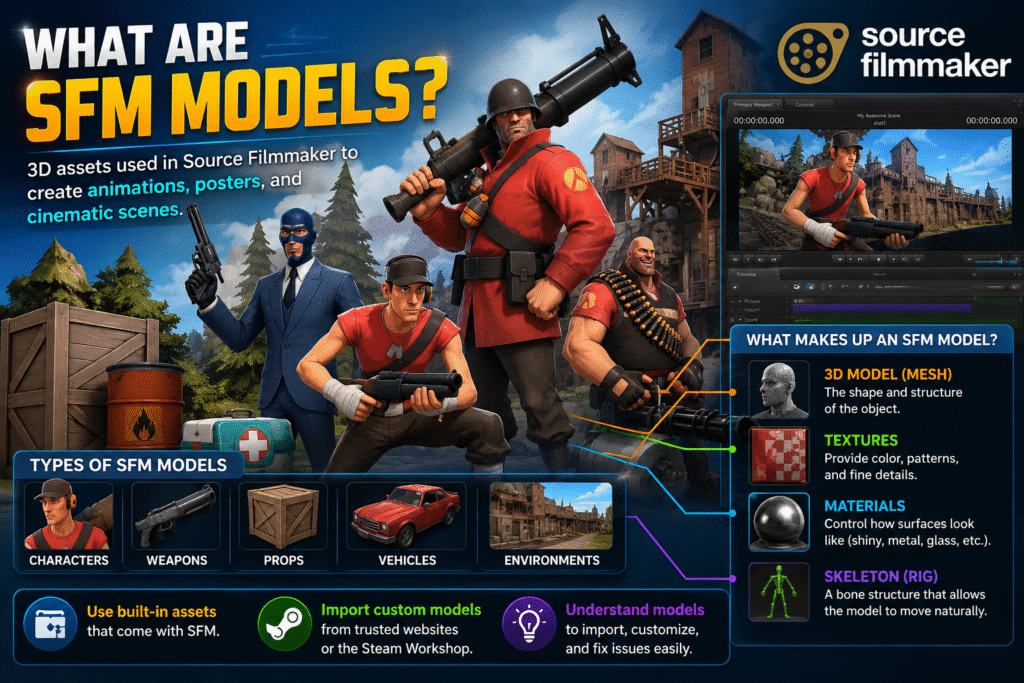
Source Filmmaker models are 3D assets used in Valve’s Source Filmmaker to create animations, posters, and cinematic scenes. These models include characters, weapons, props, vehicles, and environments that help bring a project to life.

A model is more than just a 3D object. It includes textures for appearance, materials for surface details, and a skeleton that allows it to move naturally during animation. All these elements work together to display the model correctly in Source Filmmaker.

You can use the built-in assets that come with SFM or import custom models from trusted community websites and the Steam Workshop. Understanding how these models work makes it easier to import, customize, and troubleshoot them while creating your projects.

Types of SFM Models

The most common types of SFM models include: 

  • SFM Character Models – Playable characters, NPCs, and custom avatars.
  • Prop Models – Everyday objects, furniture, tools, and decorative items.
  • Weapon Models – Guns, swords, explosives, and other equipment.
  • Vehicle Models – Cars, trucks, aircraft, boats, and other vehicles.
  • Environment and Map Models – Buildings, terrain, rooms, and complete scene layouts.

Where to Download SFM Models Safely

Here are some of the most popular websites for downloading SFM models safely: 

Steam Workshop

If you’re looking for SFM workshop models, Steam Workshop is one of the safest and easiest places to start. It is integrated with Steam, so you can browse thousands of community-created characters, props, maps, and other assets in one place.

To download a model, open the Source Filmmaker Workshop page, choose the asset you want, and click Subscribe. Steam automatically downloads the files and adds them to your Source Filmmaker library, so you don’t have to move files manually. 

Each workshop page also includes screenshots, user ratings, and creator information, helping you choose reliable models with confidence.

SFMLab

SFMLab is a popular community platform for downloading custom SFM models that aren’t available on Steam Workshop. It hosts characters, props, environments, textures, and other assets shared by artists for machinima and 3D animation projects.

Most downloads are available as ZIP or 7Z files. You’ll need to extract the files and install them manually in Source Filmmaker. Many creators also include helpful setup guides with their uploads.

GameBanana

GameBanana is a trusted community website where you can download mods and SFM props for Source Filmmaker. You’ll also find character models, maps, textures, and other community-created assets.

Each download page includes user ratings, screenshots, and community feedback. These details make it easier to find high-quality assets before downloading them.

Open3DLab

Open3DLab is a community platform that offers SFM maps, characters, props, and other assets for Source Filmmaker projects. It is a useful option when you need content that isn’t available on Steam Workshop.

Many uploads include additional resources such as textures, animations, or model variations. Make sure you download all the required files so the asset works correctly in your project.

DeviantArt

DeviantArt is home to many artists who share SFM characters and other custom assets for free. You’ll also find character ports, outfits, accessories, and model packs created by experienced members of the SFM community.

Download models from trusted creators with a good reputation. Use the links provided by the artist and avoid files from unknown or unverified sources. This helps you download authentic assets and reduces the risk of unsafe files.

Sketchfab (Compatible Assets)

Sketchfab offers a large collection of free and paid 3D models created by artists from around the world. Many of these models can be downloaded in formats like FBX or OBJ, making them useful for a blender to SFM workflow.

These models are not ready to use in Source Filmmaker. You’ll need to import them into Blender first, prepare the model, and then convert it before using it in your SFM project.

Essential File Formats Used in SFM Models

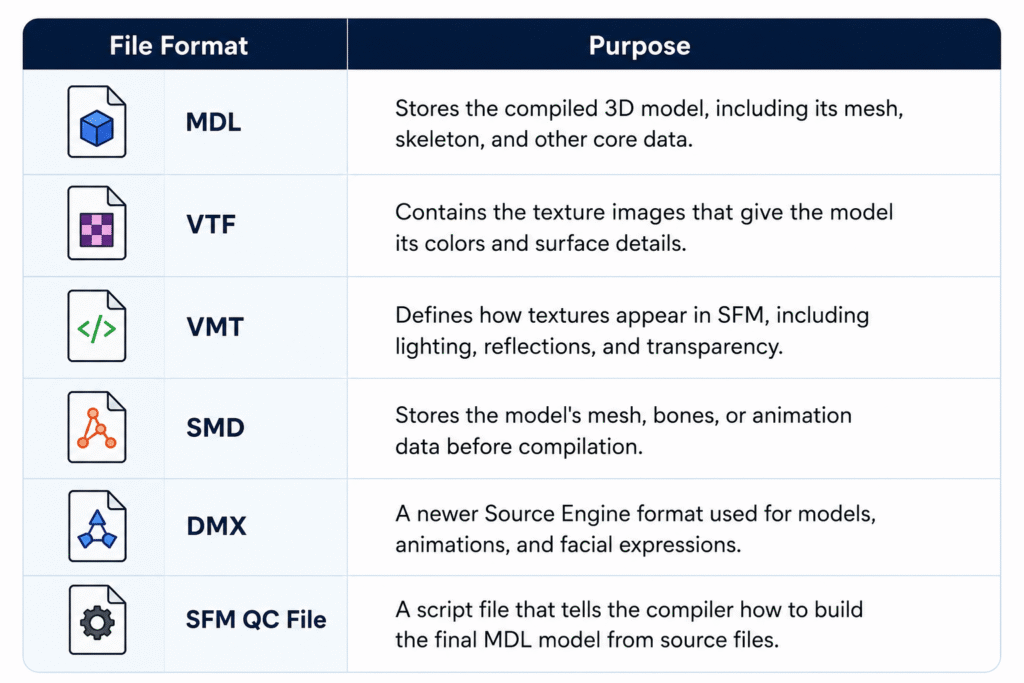
Every SFM model relies on different file formats, and each one has a specific job in displaying, compiling, and animating the model correctly.


file formats used in sfm models

How to Import SFM Models

import sfm models


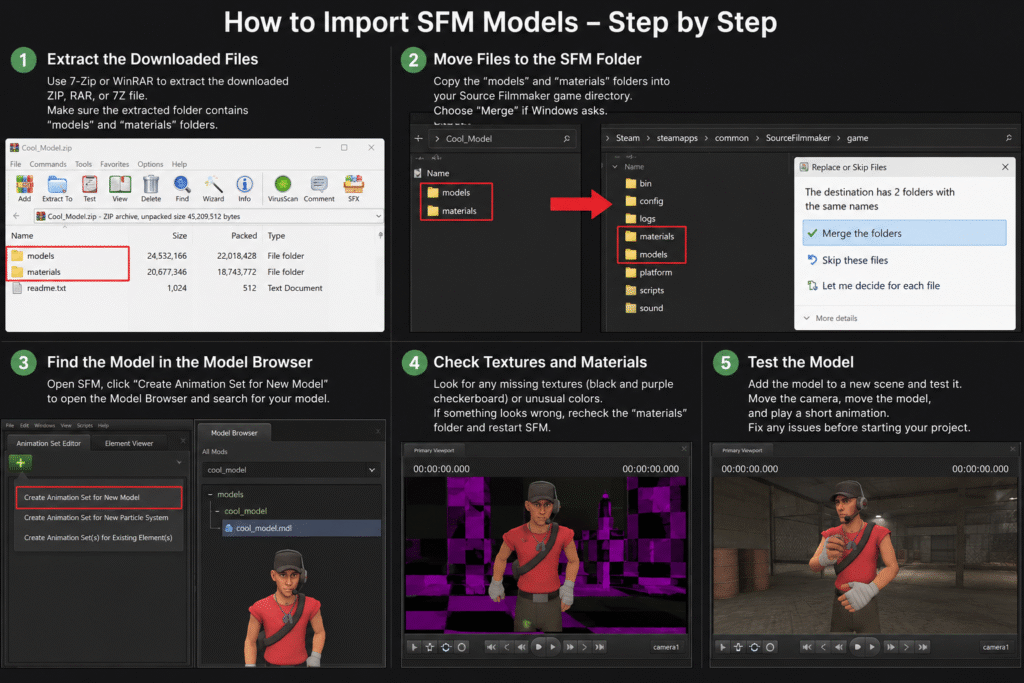
To import models into SFM, follow these steps in the correct order to ensure the model loads properly and works as expected: 

Extract the Downloaded Files

Most SFM models are downloaded as ZIP, RAR, or 7Z files to keep all the required files together. Before you can use the model, extract the archive with a tool like 7-Zip or WinRAR.

After extracting, open the new folder and make sure it contains folders such as models and materials. These folders include the files needed to install and display the model correctly in Source Filmmaker.

Move Files to the SFM Folder

Open the extracted folder and locate folders such as models and materials. Copy these folders into your Source Filmmaker game folder so the software can find the new assets.

If Windows asks to merge folders, choose Merge instead of replacing existing files. This keeps your current SFM files intact while adding the new model to your library.

Find the Model in the Model Browser

Open Source Filmmaker and create or open a session. Select Create Animation Set for New Model to open the Model Browser, then browse or search for the model you just installed.

If you can’t find the model, check that the files were copied to the correct folders and restart Source Filmmaker if needed. Some Workshop models may also appear under the Workshop filter in the Model Browser.

Check Textures and Materials

After importing the model, check that all textures and materials load correctly. If you see black and purple checkerboard patterns, missing textures, or unusual colors, some required VTF or VMT files may be missing or placed in the wrong folder.

If you notice any issues, verify that the materials folder was copied correctly and restart Source Filmmaker after making changes. This allows SFM to reload the updated files and display the model properly.

Test the Model

Add the model to a new scene and check that it loads correctly. Rotate the camera, move the model, and play a short animation to confirm that the textures, materials, and skeleton are working as expected.

If you notice SFM errors, such as missing parts, invisible models, or broken textures, review the previous installation steps before continuing with your project. Testing the model early helps you identify and fix problems before you start animating.

How to Create Custom SFM Models

Creating a custom model involves designing, SFM model compilation, and importing it into Source Filmmaker. Follow these steps in the correct order: 

Create the Model in Blender

Start by creating your 3D model in Blender using basic shapes or by editing an existing model. Keep the design clean and avoid adding unnecessary details, as simpler models are easier to edit and optimize.

Before moving to the next step, check that the model has the correct shape, scale, and proportions. Fixing these details early saves time and reduces the need for changes later.

Create UV Maps

UV mapping tells Blender how a 2D texture should wrap around a 3D model. Create a UV map before adding textures so the colors and details appear in the correct places.

After unwrapping the model, check the UV layout for overlapping or stretched areas. A clean UV map helps textures appear sharp and prevents visual distortions on the model.

Rig the Model

Rigging is the process of adding a skeleton, also called an armature, to your 3D model. This allows the model to move naturally when you create animations in Source Filmmaker. 

After adding the bones, test a few simple movements to make sure the mesh deforms correctly. Fix any parts that bend or stretch incorrectly before moving to the export step.

Export the Model Using Blender Source Tools

After the model is ready, use Blender Source Tools to export it in a Source Engine format such as SMD or DMX. These formats are supported by Crowbar and are used to prepare the model for Source Filmmaker.

Before exporting, check that the correct model and armature are selected. Save the exported files in an easy-to-find folder so you can use them during the compilation step.

Compile the Model with Crowbar

Open Crowbar and load your QC file. During SFM Compile, Crowbar uses the QC file along with the exported model files to create the final MDL file that Source Filmmaker can read.

When the compilation is complete, check the results for any errors or warnings. If the process finishes successfully, your compiled model is ready for the final import step.

Import the Model into Source Filmmaker

After SFM Compilation is complete, copy the compiled model files to the correct Source Filmmaker folders if they are not already there. Then open Source Filmmaker and use the Model Browser to locate and load your new model.

Once the model appears in your scene, check that the textures, materials, and animations work correctly. If everything loads without errors, your custom model is ready to use in your animation project.

Need Help with SEO?

Our team helps brands improve rankings through high-quality backlinks, content marketing, and proven SEO strategies. Let's discuss your goals and create a customized plan to grow your organic traffic.

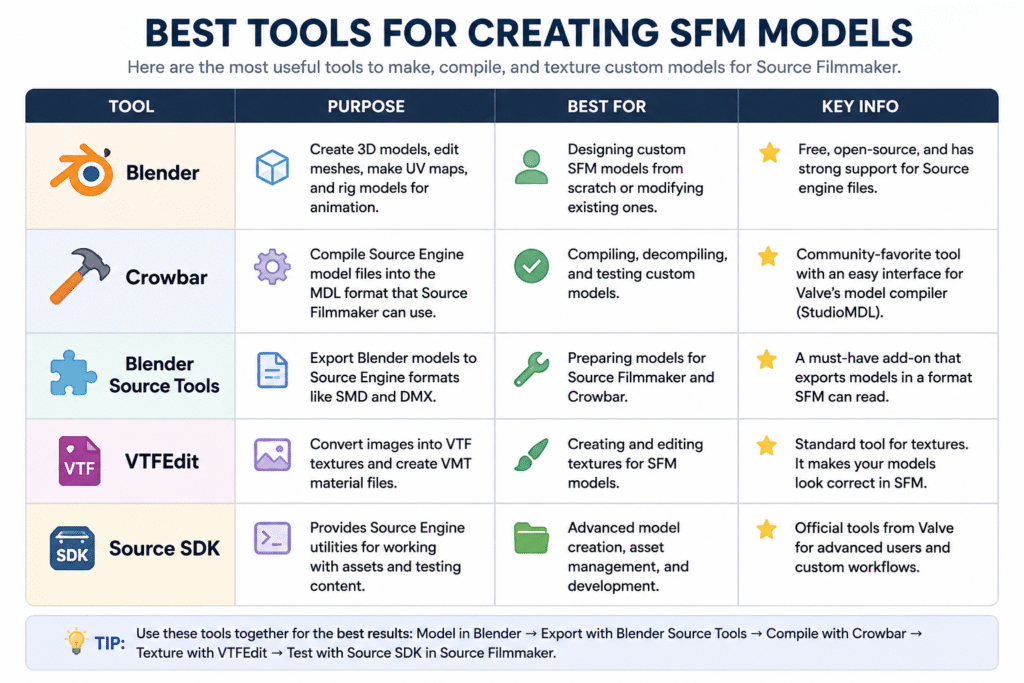
Best Tools for Creating SFM Models

The table below highlights the most commonly used SFM tools, along with their purpose, best use case, and key features.  


tools for sfm models

How to Optimize SFM Models

Use below SFM optimization tips to improve performance and reduce lag. 

Reduce Polygon Count

Models with a high polygon count require more processing power and can slow down your scene. Use simpler models whenever possible, especially for background objects that don’t need a lot of detail.

If you’re creating your own model, remove unnecessary geometry without changing its overall shape. This helps improve viewport performance and reduces rendering time, especially in larger scenes.

Optimize Textures

Large texture files use more memory and can affect performance. Choose a texture resolution that matches the model instead of using high-resolution images for every asset. 

Remove textures that are no longer needed and compress image files when possible. This reduces memory usage and helps Source Filmmaker load scenes more efficiently.

Optimize Materials

Use only the material settings your model needs. Effects like reflections, transparency, and complex shaders can increase rendering time and reduce performance. 

Keep material files simple and remove settings that aren’t being used. Well-optimized materials help models render more efficiently while maintaining a consistent appearance.

Use Level of Detail (LOD) Models

Level of Detail (LOD) models use different versions of the same model with varying amounts of detail. Source Filmmaker can display a simpler version when the model is farther from the camera, helping improve performance.

Use high-detail models for close-up shots and lower-detail versions for background scenes. This reduces the workload on your system without noticeably affecting the final animation.

Optimize Bones and Rigging

Use only the bones your model needs for animation. Extra or unused bones can make the rig more complex and increase the amount of processing required.

Check that each bone is linked correctly and moves the right part of the model. A clean rig makes animations smoother and helps prevent unexpected movement during posing or animation.

Optimize Lighting and Effects

Use only the lights and visual effects needed for your scene. Too many lights, shadows, or particle effects can slow down viewport performance and increase rendering time.

Start with a few lights and add more only when necessary. This keeps your scene easier to manage while maintaining clear and consistent lighting.

Improve Scene Performance 

Keep only the models, lights, and effects needed for your scene. Fewer objects make SFM rendering smoother and reduce the time it takes to preview or render your animation.

Close unused animation sessions and remove assets you no longer need. A clean scene is easier to work with and helps maintain consistent performance as your project grows.

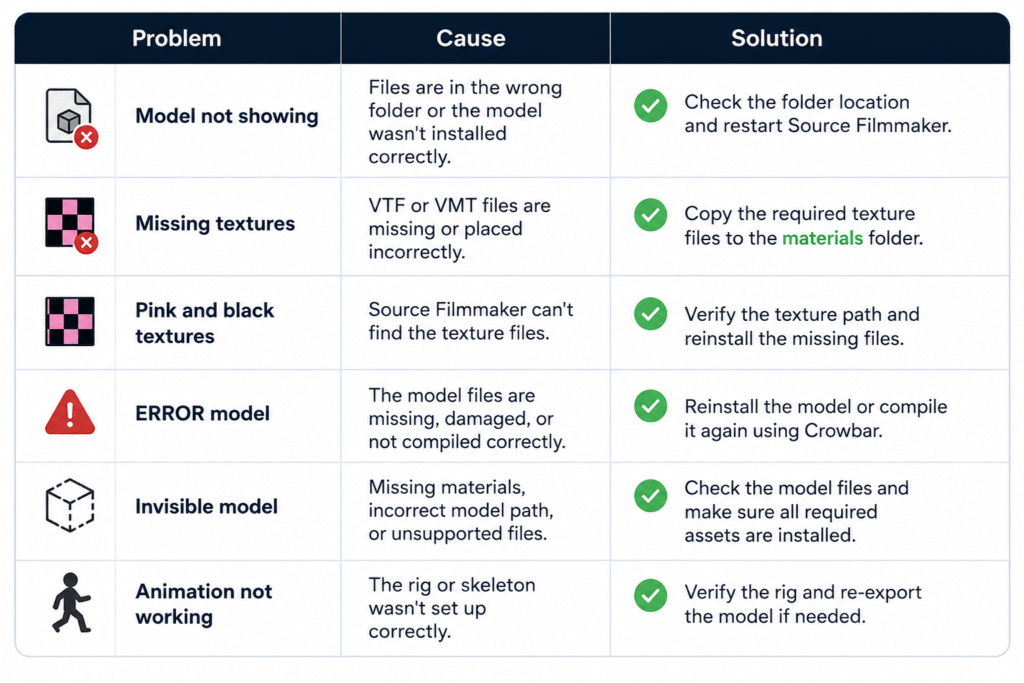
Common SFM Model Problems and Fixes

This SFM tutorial covers common model issues and their solutions. Use the table below for quick fixes. 

common problem

Best Practices for Managing SFM Models

Use these best practices from this Source Filmmaker guide to keep your models organized and avoid common issues over time.

  • Organize Your Model Library: Store characters, props, maps, and other assets in separate folders for easier access.
  • Use Clear File Names: Use simple, descriptive names to identify files quickly.
  • Keep Backup Copies: Back up custom models before editing or replacing files.
  • Remove Duplicate Assets: Delete duplicate or unused models to save storage space.
  • Store Related Files Together: Keep model files, textures, and materials in their correct folders to avoid missing file issues.
  • Download Models from Trusted Sources: Download models from reliable websites to ensure they are complete and compatible

Wrap Up

Building a smooth workflow starts with understanding how models are downloaded, imported, created, and managed. Following the right steps helps you avoid common issues like missing textures, loading errors, and compatibility problems before they affect your project.

With the right approach, SFM Models become much easier to work with. Use trusted resources, keep your files organized, and optimize your assets regularly to create cleaner scenes and a more efficient animation workflow.

FAQs

How to import models into SFM from Workshop?

Open the model’s Workshop page and click Subscribe. Steam will download the files automatically. Restart Source Filmmaker if needed, then open the Model Browser to find and use the model.

How to convert Blender models to SFM?

Create or edit your model in Blender, export it using Blender Source Tools, compile it with Crowbar, and then import the compiled files into Source Filmmaker.

Can I use models from other Source Engine games in SFM?

Yes. Many models from games like Team Fortress 2, Half-Life 2, and Left 4 Dead can be used in Source Filmmaker after they are extracted and placed in the correct folders.

Are SFM models free to use?

Many SFM models are free to download from community websites. However, always check the creator’s license before using a model in public or commercial projects.

Do all SFM models work with every version of Source Filmmaker?

No. Some models may require additional files, specific Source Engine assets, or manual setup. Always check the model’s requirements before downloading

Search Engine Basics in 2026: Everything Has Changed with AI Search

Most people are convinced they understand the concept of how search engines work. You enter the search query, and you get search results. But in 2026, what is behind the pages you see looks really different from what it did a few years ago.

It’s being driven by artificial intelligence.

The results page you see today is not just a list of links. There are AI-generated summaries, direct answers, and cited sources coming over everything else. 

But still, the businesses winning in search right now, and in the past, have not let go of their foundational search engine basics. Despite everything AI does, the underlying structure and methodology for how a search engine discovers and evaluates your content remains exactly the same.

This guide walks you through the internet search engine basics from scratch, what has changed actually now in 2026, and what impact it will have on your website.

What Are Search Engine Basics?

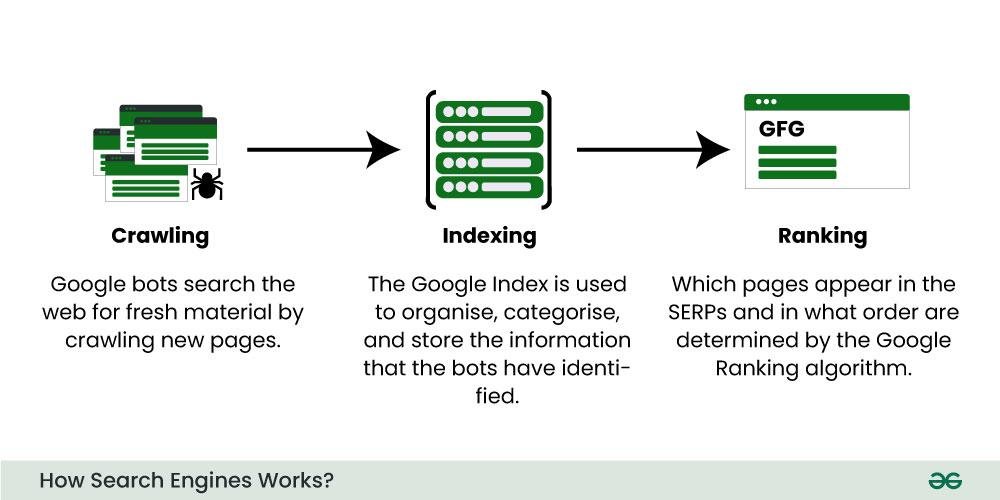
how search engine works

Source:– geeksforgeeks

Simply put, the function of a search engine is to enable people to discover information on the internet. You enter a query, and the search engine scans through trillions of websites to deliver the most appropriate results. 

These three things are the basic functions of a search engine: crawl, index, and rank, and have been since time immemorial, including the AI-powered ones. 

Crawling: This process begins when search engines discover any new content. Crawlers, also known as bots or spiders, are automatic pieces of software that travel around the internet by accessing link after link from one site to another. 

Indexing: In this next phase, any content which is discovered while crawling will be compiled and stored in a huge database which can be rapidly searched and recalled.

Ranking: It’s the last step. The user types the query, the search engine retrieves relevant pages from its index, and orders them according to hundreds of signals – relevance, authority, page quality, and more. 

The search engine basics should not be missed because, without them, any SEO effort that you undertake does not build upon solid grounds. You cannot optimise what you do not know.

Types of Search Engines in 2026

Not all search engines work the same way or serve the same purpose. In 2026, there are three main categories worth knowing.

Traditional Search Engines

These are probably the first search engines people think about. Even now, Google, Bing and Yahoo still process most of the search requests happening across the world. All three of these search engines thoroughly scan the web, compile very large indexes, and deliver ordered sets of results. Google still dominates, though Bing has started catching up due to its tight integration with various Microsoft AI-based software tools.

Classic search engine examples here include Google, Bing, Yahoo, Baidu, and DuckDuckGo.

Vertical or Niche-Specific Search Engines

These index content within a category, such as YouTube for videos, Amazon for products, LinkedIn for professional information, or Zillow for property listings. Each of these could be considered a search engine in its own. 

Quite a lot of those belong to niche search engines. Here are 10 examples of search engine types to give you some perspective: YouTube, Amazon, Pinterest, Booking.com, LinkedIn, Etsy, Indeed, Yelp, Houzz, and Zillow. Working these requires a different set of SEO skills entirely.

AI-Powered Search Engines

Perplexity, Google AI Overviews, ChatGPT Search and Microsoft Copilot bring several pages together, stitch together the content and respond to your query right on the Search Engine Results Page (SERP).

The person doesn’t even have to navigate to your webpage, and you have answered the question in a “zero-click” scenario, as SEO professionals have named it. Your page can have great organic rankings, but since the answer was shown above the fold of your page, the user never visits the site to navigate your content.

How Do Search Engines Work 

Here’s how search engines work in a step-by-step process for the clear sake of knowing what happens when someone types in a query. 

Discovery: A crawler lands on a different URL because of a submission via a sitemap, or they clicked a link to another page. This is why sitemaps and internal linking matter.

Crawling: The bot crawls the page’s content, code, and links. It verifies the headings, text, imagery, and speed of the page. The basics of how search engines actually crawl your site are essential here; failing this initial phase with robots.txt blocking your site or internal dead links is what most people struggle with first.

Indexing: Provided the content is crawlable and adheres to quality criteria, the search engine will add it to its index. Some thin-content pages or pages with no defined subject, or duplicate textual content on some pages may never be indexed or given a poor rank.

Ranking: When someone searches, the engine compares your query against its index of the web and passes it through its algorithm to determine the result. What comes out is an ordered list or, with modern AI search engines, a compiled answer from numerous indexed pages.

Display: The results show up on the page. Usually, in traditional search, this is a ranked list. For AI search, it’s going to be a paragraph, and there are citations underneath it.

The next step depends on the previous one. If your site is not crawlable, then your site is not indexable. If your site is not indexable, then your site is not rankable. The degree of understanding search engine basics will show you what you should be looking at when things start going wrong.

Key Search Engine Ranking Factors in 2026

Although the same ranking factors were important five years ago and still are important today, there are some factors that have been introduced since 2026.

Content quality and depth are the leading contributors. This is because search engines have a preference for the page which properly answers your queries, rather than those full of keywords.

E-E-A-T (Experience, Expertise, Authoritativeness, Trustworthiness) is now at the core of how Google judges content. It counts regardless of the subject matter. 

Backlinks remain incredibly powerful. Search engines perceive an authoritative link that is related to your content as evidence that you’ve produced content worth referring to. Getting a significant number of backlinks needs a strong backlink-building methodology.

Page experience metrics like site speed, mobile use, and the Core Web Vitals impact ranking. If your site is slow to load, it cannot compete.

Structured data is becoming increasingly prevalent because of the boom in AI search. If your content is properly structured, there will be a higher chance that the AI search engines can understand and reference your work in AI-driven responses.

Topic authority is a new and more essential concept. Websites that produce in-depth content are valued over those that publish single articles on obscure topics.

That’s when the Search engine basics come into play. These factors – content, authority, technical health and links – are far from trends. They are the non-negotiables.

Why AI-Built Websites Lack SEO Basics

Many businesses are relying heavily on AI in 2026 to create websites and push content quickly. But speed is not the same as structure.

Often, what AI tools leave behind is all the technical groundwork required by search engines. Pages go live without headings arranged hierarchically, missing or random internal links, non-specific meta-descriptions, and incomplete crawl paths. 

This content could be perfectly readable for a human, but for the search engine bot, on the other hand, this page looks like a mess with zero signals of the core subject of the site, no proper structure and no sign of high authority on the page.

This is precisely the reason why learning search engine basics has become the absolute most crucial requirement in 2026. Even though AI can churn out all your website content much faster, it cannot substitute for clever and effective strategies necessary for developing a website that search engines will actually use to index and list your site above other search results.

SEO Challenges in 2026

This move towards AI-driven search also comes with challenges and issues that didn’t exist before. 

The number one challenge is zero-click results. Google’s AI Overviews now provide answers to many searches even before a user ever scrolls to organic results. Many websites that depend on top-of-the-funnel traffic see a lot of their traffic decline.

Personalised results may make it hard to know where you truly stand. When two people do the exact search from two unique locations, and with varied search histories, it can result in different result pages.

Search is evolving with conversational queries. People no longer type simple keywords but fully formed questions when they search. You need to structure your content in this way, too, instead of merely targeting keywords.

Content saturation is real. With the ability for AI to publish at nearly zero cost and zero time, websites are clogged with so much content. To even stand out, one needs to have real value, a unique perspective, & well built off-page SEO signals.

The Future of Search Engines

There’s one clear direction for Search: the engine does more of the work, and the user does less. You don’t have to type in a well-formed search query and scroll through links; you ask, and the Search engine does the rest.

A big part of this transition is multimodal search. It means people search using an image, a video or a voice input rather than using only text. If you optimise content only for typed queries, you are missing a growing portion of how people search. 

AI agents are going even further. AI tools crawl websites, bring information together from different sources and give you an answer at the end. You don’t have to click or go to any pages; you get one single output.

For website owners, it’s a whole different game in what a successful presence on a search engine actually is. It’s no longer about appearing on page one; it’s now about becoming a source that AI engines know they want to reference when generating their answer.

It takes four things to get there: in-depth, accurate content on a subject; excellent technical foundations so search engines can crawl a page easily; proper schema that helps AI tools read and comprehend your content; and a backlink profile that signals authority.

All businesses willing to invest in guest post services and build out their off-page authority will be set up for a bright future.

FAQs

What are search engine basics?

The basics of a search engine (and SEO fundamentals) can be defined as a sequence of procedures to search for information, collect, analyse, and show the relevant material. Search engines comprise of 3 primary steps: Crawling, Indexing and Ranking

Why are search engine basics important for SEO?

If you do not know the basics of how search engines work, you may be prone to certain technical SEO mistakes which cause your content to disappear from the search index totally.

Is SEO replaced by AI?

No. Although search results have changed through AI, the underlying work of crawling, indexing, and ranking is all still there. In a way, SEO is transforming rather than disappearing. 

What is a search engine and its types?

Search engine: it is a software that retrieves information from the web based on a query a user has typed in the search bar. Generally, there are three categories of search engines: the ‘basic’ or’ general’ ones like Google or Bing, the’ vertical’ or’ special’ ones like Amazon and then the ‘AI’ ones like Perplexity or ChatGPT Search.

Final Word

The way people search has changed significantly. AI is now part of every major search engine, and the results page looks nothing like it did a few years ago. But the search engine basics, crawl, index, and rank, are still running underneath. 

The current top-performing sites in search create thorough, in-depth content on topics, receive good links from credible resources and have the proper technical structure. That’s what had been working all of prior to AI search. 

If ranking in 2026 is a priority for you, stick to the fundamentals. Make sure your site can be crawled. Write content that people and search engines both find useful. Build links that carry real weight.

SFM Compile: Complete Guide to Workflow, Process, QC Files & Common Errors (2026)

You spend hours creating a 3D model. The textures look perfect. The animations are ready. Then you import it into Source Filmmaker, and instead of your character, you see a purple-and-black checkerboard or nothing at all. It is a frustrating moment that almost every beginner experiences.

SFM Compile solves that problem. It converts 3D models from formats like FBX or OBJ into files that the Source Engine can read. It also packages textures, animations, physics data, and other assets using a QC file, so your model loads correctly in Source Filmmaker.

By the end of this guide, you’ll know how to compile models correctly, understand the files created during compilation, avoid common mistakes, and follow a workflow that saves time. 

Software You’ll Need for SFM Compile

SFM Compile

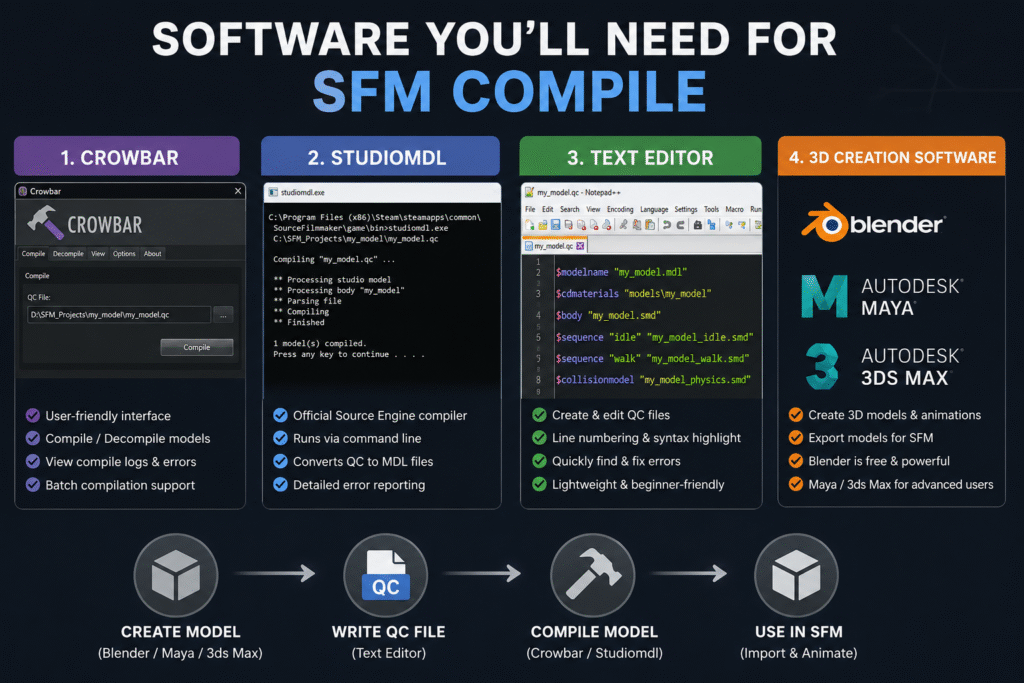
Before you compile a model, you need a few essential tools. Each piece of SFM compile software has a specific job in the workflow. 

Crowbar Compilation Tools

Crowbar is one of the most popular tools for compiling Source Filmmaker models. Instead of typing long command-line instructions, you can compile models through a simple interface. This makes the process much easier, especially if you’re new to SFM.

You can use Crowbar to compile or decompile models, check compile logs, and quickly spot errors if something goes wrong. It also supports batch compilation, so you can process multiple models without repeating the same steps for each one.

Studiomdl Command Line Utility

Studiomdl is Valve’s official model compiler for the Source Engine. It is included with the Source Filmmaker installation and is usually located in the bin folder. The tool reads your QC file and converts your model into the MDL files that Source Filmmaker can load.

Unlike Crowbar, Studiomdl runs through the command line, so you need to enter compile commands manually. It gives you more control over the compilation process. It also shows detailed error messages that help you find and fix problems. 

Text Editor Needs

You’ll also need a text editor to create and edit QC files. Notepad++ is a popular choice because it is lightweight, easy to use, and works well with plain text files.

Features like line numbering and syntax highlighting make QC scripts easier to read. If the compiler reports an error, you can quickly find the correct line and fix the problem without searching through the entire file.

3D Creation Software

Every SFM project starts with a 3D modeling program. Blender is the most popular choice because it’s free, powerful, and supports plugins that simplify exporting models for Source Filmmaker.

Professional artists may also use Autodesk Maya or 3ds Max to create custom models and animations. These are paid tools with advanced features, but for most beginners and hobbyists, Blender provides everything needed to build and prepare models for compilation.

SFM Compile: A Step-by-Step Guide

The SFM compile process follows a series of simple steps. Completing each one in the right order helps your model compile correctly and reduces errors. 

Set Up Your Model Assets 

Organize your model, textures, materials, and QC file into the correct folders before compiling. A clean folder structure helps the compiler locate every file and prevents path-related errors.

Keep your model optimized and use Source Engine bone naming conventions. Export the main model and collision mesh as separate SMD files. Also, verify that all VMT and VTF material files are in the correct location. Missing material files or incorrect paths usually cause the purple-and-black checkerboard texture in Source Filmmaker.

Before compiling, check that every file name and path matches the entries in your QC file. This simple step can prevent many common compile errors.

Write a Valid QC File 

An SFM QC file tells the compiler how to build your model. It defines where your model files are stored, where to save the compiled output, which materials to use, and which animations or physics data to include. 

QC Directive Purpose
$modelname Sets the name and output location of the compiled model.
$body Specifies the main SMD model file to compile.
$cdmaterials Points to the folder containing your material (VMT) files.
$sequence Adds animation sequences to the compiled model.
$collisionmodel Defines the collision mesh used for physics interactions.

Before compiling, review every file name and folder path in the QC file. A single typo or missing file reference can prevent the model from compiling successfully.

Run the SFM Compiler

Once your model assets and QC file are ready, it’s time to run the SFM compiler. If you’re using Crowbar, open the Compile tab, select your QC file, and click Compile. Crowbar displays the compile log in a readable format, making it easier to spot missing files or incorrect paths.

If you’re using studiomdl.exe, open the command line, navigate to the bin folder in your Source Filmmaker installation, and run the compiler using your QC file as the input. After the process finishes, review the compile log for warnings or errors before importing the model into Source Filmmaker.

Perform Final Model Testing

Open Source Filmmaker and load your compiled model into a new scene. Check that the model appears correctly, the textures load properly, and the animations play without errors. Move the model’s joints to confirm the bones are working as expected.

If you notice missing textures, distorted meshes, or physics problems, review the compile log first. The log often identifies the QC directive or file that caused the issue, making it much faster to find and fix the problem before compiling again.

Need Help with SEO?

Our team helps brands improve rankings through high-quality backlinks, content marketing, and proven SEO strategies. Let's discuss your goals and create a customized plan to grow your organic traffic.

Understanding SFM Compile Output Files

Every successful compilation generates several output files. Each file has a specific role, and if one is missing, your model may not load or function correctly.

File Purpose
.MDL The main model file that Source Filmmaker loads.
.VVD Stores vertex data used to render the model correctly.
.DX90.VTX Contains optimized mesh data for DirectX 9 rendering.
.SW.VTX Stores mesh data for software rendering compatibility.
.PHY Holds collision and physics information if the model uses physics.
.ANI  Stores animation data for some compiled models.

If any required output file is missing or corrupted, Source Filmmaker may fail to load the model or display it correctly.

Common SFM Compile Errors and Their Solutions

sfm compile errors

                                                      Source: FOSS post

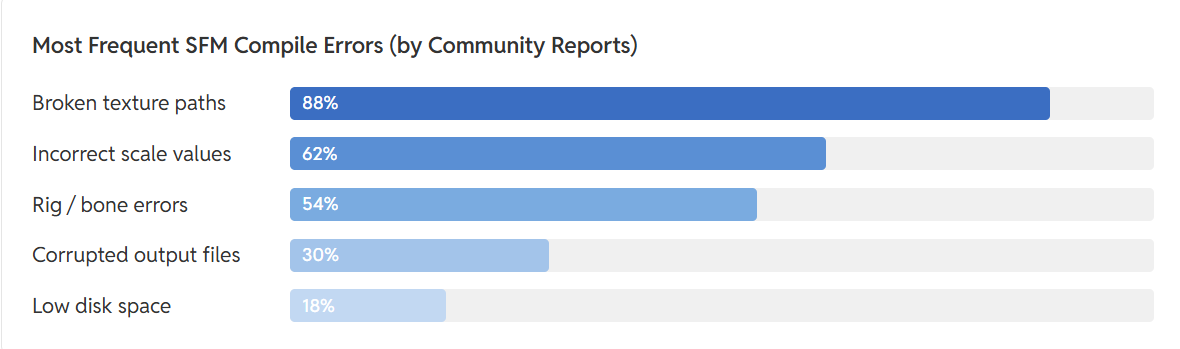
Most common SFM compile errors are caused by missing files, incorrect QC settings, or invalid file paths. The compile log usually identifies the file or QC directive responsible.

Error Cause How to Fix It
Purple-and-black checkerboard textures Missing or incorrect VMT/VTF files, or an invalid $cdmaterials path Verify the material files exist and update the $cdmaterials path in the QC file.
Model is invisible or the wrong size Incorrect export scale or unit settings Re-export the model using the correct scale and apply transforms before exporting.
Bones don’t move correctly Missing or incorrectly named bones, or rigging errors Check the skeleton hierarchy and use Source Engine bone naming conventions.
Model fails to compile Missing SMD files, incorrect file paths, or QC syntax errors Review the compile log and fix the reported file path or QC directive.
Source Filmmaker crashes when loading the model Corrupted compile output or unsupported model data Recompile the model after fixing errors and replace any damaged output files.

SFM Compile Workflow Best Practices

SFM Compile Workflow

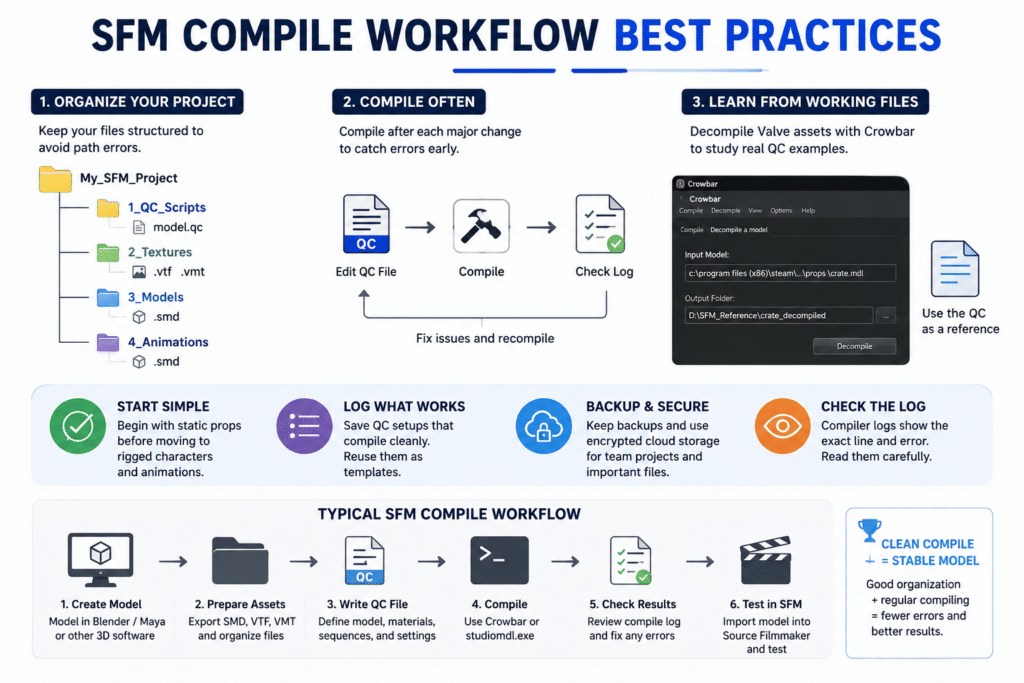
Following a few SFM compile best practices can help you avoid repeated errors and make your workflow easier to manage.

  • Organize your project into separate folders for models, textures, materials, and QC files. This keeps file paths consistent and reduces compile errors.
  • Save a copy of every QC file that compiles successfully. You can reuse it as a template for future projects.
  • Start with simple static models before compiling animated characters or complex rigs.
  • Compile after every major change instead of making multiple edits at once. This makes it easier to identify what caused an error.
  • Decompile Valve’s default models with Crowbar to study working QC files and folder structures.
  • Keep backup copies of your project files. If you’re working with a team, use secure cloud storage with version history to avoid losing changes.

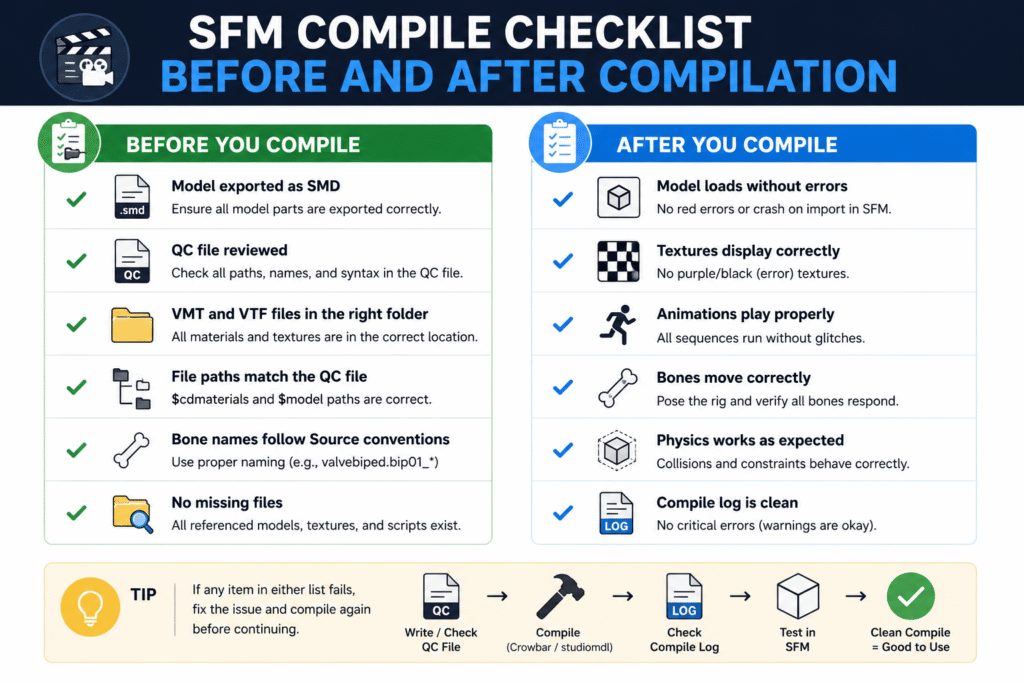
SFM Compile Checklist Before and After Compilation

SFM Compile checklist

A quick checklist helps you catch small mistakes before they become compile errors. Review these points before compiling and after importing your model into Source Filmmaker.

Beginner’s Guide to SFM Compile

SFM compile for beginners becomes much easier when you learn one step at a time. Start with simple models, understand the basics, and build confidence before working on complex projects. 

Start with a Simple Low-Polygon Model

Start with a simple static prop instead of a fully rigged character. A low-polygon model with a single texture is easier to compile and helps you learn the workflow without dealing with bones, animations, or complex physics.

Once the model compiles successfully, test it in Source Filmmaker to confirm it loads correctly. After that, you can move on to animated models and more advanced projects.

Install and Set Up Your SFM Tools 

Install Crowbar, studiomdl.exe, and a text editor like Notepad++ before you start compiling models. Also, confirm that Crowbar points to the correct studiomdl.exe location, or the compile process won’t run.

Keep your project files in one workspace with separate folders for models, textures, materials, and QC files. A well-organized setup reduces file path errors and makes the entire workflow easier to manage.

Create Your First QC File

Create your first QC file manually, even if Crowbar can generate one automatically. Writing it yourself helps you understand what directives like $modelname, $body, and $cdmaterials actually do, making future troubleshooting much easier.

Start with only the essential directives and confirm the model compiles successfully. Once the basics work, you can add animations, collision models, and other advanced settings as your project grows.

Compile and Test Your Model 

Don’t wait until your entire project is finished before compiling. Compile the model after each major change, then load it in Source Filmmaker to check that the model, textures, and animations work as expected.

If you find a problem, review the compile log, fix the issue, and compile again. Testing in small steps makes errors easier to identify because you know exactly which change caused them.

Study Existing Decompiled Models

Use Crowbar to decompile Valve’s default models and examine their project files. Looking at real QC files, folder structures, and material paths is one of the fastest ways to understand how a correctly compiled model is organized.

Don’t copy these files directly. Instead, use them as a reference to learn naming conventions, QC directives, and project layouts. This approach helps you avoid common mistakes when creating your own models.

Read More About:- Cybersecurity SEO Agencies

Wrap Up

Learning SFM Compile is less about memorizing commands and more about following a consistent workflow. Organizing your files, creating a clean QC file, checking the compile log, and testing after every change will help you solve most problems before they become difficult to fix. 

As your experience grows, you can move from simple props to fully animated characters and more advanced projects. Keep practicing, study working models, and improve your workflow one step at a time. A solid understanding of the compile process gives you the confidence to create reliable custom assets for Source Filmmaker. 

FAQs

What file types does SFM Compile accept?

SFM Compile uses SMD, DMX, and QC files as input. After compilation, it generates files like MDL, VVD, VTX, and PHY for the Source Engine.

Why does my model show purple-and-black checkerboard textures?

This usually means the material files are missing or the texture path is incorrect. Check the VMT, VTF, and $cdmaterials entries in your QC file.

How long does SFM Compile take?

Simple models usually compile in a few seconds. Larger models with animations or multiple LODs can take several minutes, depending on your computer.

Does SFM Compile work with Source 2?

No. SFM Compile is designed for the original Source Engine. Source 2 uses a different asset pipeline and requires different tools.

Do I need programming knowledge to use SFM Compile?

No. You only need to edit a QC file with basic text commands. Most beginners can compile simple models without any programming experience.